Best Port Gigabit Switches

Unlock Peak Network Performance: The Definitive Guide to the Best Port Gigabit Switches
The backbone of any modern digital infrastructure, from a bustling home office to a sprawling enterprise network, relies heavily on the performance and reliability of its network switch. Specifically, the ubiquity and speed offered by Gigabit Ethernet have made port Gigabit switches an indispensable component. This guide dives deep into what constitutes a "best" port Gigabit switch, exploring key features, essential considerations, and recommending top-tier options that cater to diverse needs. Whether you’re a home user seeking to eliminate buffering during streaming and gaming, a small business owner aiming to boost employee productivity, or an IT professional demanding robust and scalable solutions, understanding the nuances of Gigabit switches is paramount. We will dissect the technical specifications that truly matter, analyze the impact of different port configurations, and evaluate the critical functionalities that differentiate exceptional switches from the merely adequate, ensuring you can make an informed decision that maximizes your network’s potential and future-proofs your investment.
The fundamental function of a Gigabit switch is to connect multiple network devices within a Local Area Network (LAN), facilitating high-speed data transfer between them. The "Gigabit" designation signifies a data transfer rate of one billion bits per second (Gbps) per port. This is a substantial upgrade from older Fast Ethernet (100 Mbps) standards, enabling smoother video conferencing, faster file transfers, seamless online gaming, and the efficient operation of bandwidth-intensive applications. When selecting a port Gigabit switch, the number of ports is a primary determinant of its suitability for your network’s size. Common configurations range from 5-port and 8-port switches ideal for smaller home networks or discrete workstation clusters, to 16-port, 24-port, and even 48-port models designed for growing businesses or more complex home setups. The "best" switch for you will directly correlate with the number of devices you need to connect, with the crucial caveat of leaving room for future expansion. Over-subscribing ports, while sometimes cost-effective initially, can lead to performance bottlenecks, increased latency, and a degradation of overall network responsiveness, particularly under heavy load. Therefore, it’s always advisable to choose a switch with more ports than your immediate needs dictate.
Beyond port count, the type of ports significantly influences a Gigabit switch’s capabilities. Standard RJ45 ports are the most common for Ethernet cables. However, advanced switches may incorporate SFP (Small Form-Factor Pluggable) or SFP+ ports. These are modular slots that accept transceivers, allowing for fiber optic connections or higher-speed copper connections (10Gbps with SFP+). Fiber optic connections are crucial for extending network distances beyond the typical 100-meter limit of copper Ethernet and offer superior immunity to electromagnetic interference, making them ideal for industrial environments or connecting buildings across a campus. For businesses or advanced home users requiring high-speed uplinks to routers, servers, or other switches, the inclusion of 10Gbps SFP+ ports on a Gigabit switch provides a significant performance upgrade, preventing the uplink from becoming a bottleneck. Conversely, for most typical home and small office scenarios, a pure 1Gbps RJ45 port configuration is more than sufficient.
Managed versus Unmanaged switches represent a critical decision point impacting network control and flexibility. Unmanaged switches are plug-and-play devices. They operate on a basic level, forwarding traffic based on MAC addresses without any user configuration. They are cost-effective, simple to deploy, and ideal for basic network needs where advanced traffic management or security features are not required. Examples include connecting a few computers and a printer in a small office or setting up a home entertainment system. Managed switches, on the other hand, offer a wealth of advanced features that allow for granular control over network traffic, enhanced security, and improved performance. These features typically include:
- VLANs (Virtual Local Area Networks): VLANs segment a physical network into multiple logical networks. This improves security by isolating traffic between different departments or user groups, enhances performance by reducing broadcast traffic, and simplifies network management. For instance, a business could create separate VLANs for their accounting department, sales team, and guest Wi-Fi, preventing inter-departmental traffic and improving security.
- QoS (Quality of Service): QoS allows network administrators to prioritize certain types of traffic over others. This is essential for applications that are sensitive to latency and jitter, such as VoIP (Voice over Internet Protocol) and video conferencing. By assigning a higher priority to voice traffic, for example, you can ensure clear and uninterrupted phone calls even when the network is experiencing high utilization.
- Port Mirroring: This feature allows you to copy all traffic from one or more ports to a designated monitoring port. This is invaluable for network troubleshooting, performance analysis, and security monitoring, enabling the use of network analysis tools without disrupting active network traffic.
- Link Aggregation (LAG) / Port Trunking: LAG allows you to combine multiple physical ports into a single logical link, increasing bandwidth and providing redundancy. If one of the aggregated links fails, traffic is automatically rerouted through the remaining links, ensuring continuous connectivity. This is commonly used for uplinks to servers or other switches where high throughput is critical.
- SNMP (Simple Network Management Protocol): SNMP enables remote monitoring and management of network devices. This allows IT administrators to track switch status, performance metrics, and potential issues from a centralized location, facilitating proactive maintenance and rapid problem resolution.
- Access Control Lists (ACLs): ACLs are sets of rules that control network traffic based on criteria such as source/destination IP addresses, ports, and protocols. They are a powerful security tool for filtering unwanted traffic and enforcing network access policies.
The decision between a managed and unmanaged switch hinges on your technical expertise, budget, and the complexity of your network. For most home users and very small businesses, an unmanaged switch is perfectly adequate. However, for businesses that require robust security, efficient traffic management, and scalability, a managed switch is a worthwhile investment.
Power over Ethernet (PoE) is another transformative feature found in many Gigabit switches, particularly those aimed at business or advanced home users. PoE technology allows the switch to deliver electrical power to connected devices over the same Ethernet cable that transmits data. This eliminates the need for separate power adapters for devices like IP cameras, wireless access points, VoIP phones, and some IoT devices. This simplifies installation, reduces cable clutter, and allows devices to be placed in locations where AC power outlets are not readily available. PoE comes in several standards, with the most common being IEEE 802.3af (PoE), which provides up to 15.4 watts per port, and IEEE 802.3at (PoE+), which offers up to 30 watts per port. IEEE 802.3bt (PoE++) is a newer standard that can provide even higher power levels (up to 90 watts), supporting more power-hungry devices. When selecting a PoE-enabled switch, it’s crucial to consider the total power budget of the switch, which is the sum of the power it can deliver across all its PoE ports simultaneously. You must ensure the switch’s power budget can accommodate the power requirements of all your connected PoE devices.
Form factor and physical design are also important, albeit secondary, considerations. Most Gigabit switches are designed for rack mounting in server rooms or network closets, utilizing a standard 1U height. However, smaller desktop models are available for home users or situations where rack mounting is not feasible. Noise levels can be a factor, especially for desktop or small office deployments, as higher-performance switches, particularly those with active cooling fans, can generate audible noise. Fanless designs are ideal for quiet environments but may be limited to lower port counts or less powerful hardware to manage heat dissipation effectively. Build quality and durability are also important, especially for business-grade switches that are expected to operate continuously in demanding environments. Metal casings and robust internal components generally indicate a more reliable and long-lasting device.
When evaluating specific port Gigabit switch models, several brands consistently stand out for their performance, reliability, and feature sets.
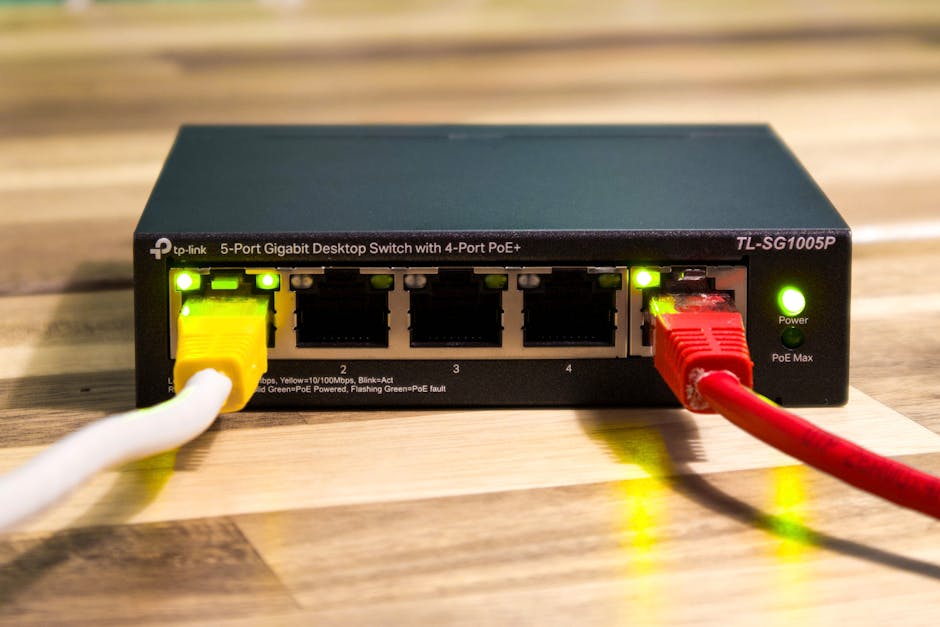
TP-Link offers a wide range of Gigabit switches, from affordable unmanaged desktop models to more advanced managed solutions. Their TL-SG1008D is a popular choice for basic home and small office use, offering plug-and-play simplicity and energy-saving features. For more demanding needs, their JetStream series provides fully managed switches with advanced features like VLANs and QoS, often at competitive price points. TP-Link’s PoE switches, such as the TL-SG1008P, are also well-regarded for their balance of features and affordability, making them a strong contender for businesses deploying IP cameras or wireless access points.
Netgear is another prominent player, known for its reliable and feature-rich networking equipment. Their unmanaged Gigabit switches, like the GS308, are solid performers for everyday use. Netgear’s ProSAFE managed switches offer robust capabilities for business environments, including advanced security features and comprehensive management options. Their PoE+ switches are particularly well-suited for powering multiple high-demand devices. Netgear also offers switches with higher port densities and 10Gbps uplinks for more performance-critical applications.
Ubiquiti Networks has carved out a significant niche with its UniFi line, offering a scalable and integrated ecosystem for networking. Their UniFi Switch series, while often requiring the UniFi Controller software for full management, provides exceptional performance, advanced features, and a sleek aesthetic. These switches are popular among IT professionals and businesses looking for a unified management platform for their entire network, including switches, access points, and routers. Ubiquiti’s PoE capabilities are robust, and their switches often boast impressive throughput and low latency.
Cisco is a long-standing industry leader, particularly in enterprise-grade networking. Their Catalyst and Small Business series offer a vast array of port Gigabit switches, from basic unmanaged models to highly sophisticated managed switches with extensive features for large-scale deployments. Cisco switches are renowned for their reliability, security, and advanced management capabilities, but they often come with a premium price tag. For businesses with complex networking requirements and dedicated IT staff, Cisco remains a top choice.
D-Link provides a broad spectrum of Gigabit switches, catering to both home and business users. Their DGS series offers unmanaged and smart-managed switches with various port configurations and PoE options. D-Link switches are often praised for their ease of use and value for money, making them a viable option for budget-conscious deployments.
When selecting the best port Gigabit switch, consider the following critical factors in your decision-making process:
- Port Count and Future Growth: As discussed, ensure you have enough ports for current needs and at least 20-30% buffer for future expansion.
- Managed vs. Unmanaged: Determine if your network complexity and security requirements necessitate the advanced features of a managed switch.
- PoE Requirements: If you plan to deploy PoE devices, verify the switch’s PoE standard, total power budget, and per-port power output.
- Uplink Speed: For core switches or those connecting to high-speed internet or servers, consider switches with 10Gbps SFP+ ports.
- Performance Metrics: Look for switches with high switching capacity and forwarding rates, typically measured in Gbps and Mpps (Million packets per second), respectively. These indicate the switch’s ability to handle high traffic volumes without performance degradation.
- Noise Level: For home or office environments where noise is a concern, opt for fanless models or switches with quiet fans.
- Brand Reputation and Support: Choose reputable brands with good customer support and warranty policies.
- Budget: While investing in quality is important, balance features and performance with your financial constraints.
In conclusion, the "best" port Gigabit switch is not a one-size-fits-all solution. It’s a carefully considered choice based on your specific network topology, intended applications, budget, and technical expertise. By thoroughly understanding the distinctions between managed and unmanaged switches, the benefits of PoE, the importance of port configurations, and the performance metrics that truly matter, you can confidently select a Gigabit switch that will serve as a reliable and high-performing foundation for your network, ensuring seamless connectivity and optimal data flow for years to come. The right Gigabit switch is an investment in efficiency, productivity, and a frustration-free digital experience.


/cdn.vox-cdn.com/uploads/chorus_image/image/52927257/usa_today_9810070.0.jpg)


