Justin Bieber and Billie Eilish’s Coachella "One Less Lonely Girl" Moment Sparks Merchandise Frenzy

The unexpected on-stage collaboration between pop titans Justin Bieber and Billie Eilish during the second weekend of Coachella 2026 has ignited a fervent response from fans, leading to an immediate surge in fan-made merchandise celebrating the viral moment. The duet, which saw Bieber serenade Eilish with his early 2009 hit "One Less Lonely Girl," has not only dominated social media discussions but has also translated into a tangible trend on e-commerce platforms, with entrepreneurs quickly capitalizing on the shared excitement. This artistic convergence, occurring amidst the iconic desert festival, has cemented its place in pop culture history, prompting a demand for keepsakes that immortalize this significant crossover.
A Coachella Surprise: The Genesis of a Viral Moment
Coachella, renowned for its surprise guest appearances and genre-bending collaborations, once again delivered an unforgettable spectacle. During his highly anticipated Weekend Two set, Justin Bieber, a seasoned performer who has captivated audiences for over a decade, brought a fellow superstar onto the stage: Billie Eilish. The moment unfolded as Bieber transitioned into his early career anthem, "One Less Lonely Girl," a track from his 2009 My World EP. This performance was particularly poignant as it recreated the song’s original fan-interaction concept, where Bieber would select an audience member to join him on stage for a personal serenade. This time, the chosen "lonely girl" was none other than Eilish herself, a two-time Grammy winner and a significant figure in contemporary music.

The live rendition quickly became a focal point of the festival, with clips of the exchange spreading rapidly across social media platforms. Fans were captivated by the genuine camaraderie and mutual admiration displayed between the two artists, highlighting Eilish’s long-standing admiration for Bieber, a sentiment she has openly expressed over the years. This shared moment at Coachella served as a powerful visual representation of Eilish’s journey from a devoted fan to a peer of her idol.
"One Less Lonely Girl": A Legacy Reimagined
"One Less Lonely Girl" holds a special place in the discography of Justin Bieber. Upon its release, the song was an instant fan favorite, largely due to its interactive performance style. During his early tours, Bieber would famously bring a young female fan on stage, seat her on a stool, and perform the song directly to her, creating an intimate and often emotional experience for the audience. These performances became a signature element of his live shows, with numerous clips circulating online depicting fans overcome with emotion. The song’s cultural impact even extended to the realm of film, notably inspiring a scene in director Megan Park’s 2024 teen drama, My Old Ass, where a character recreates the drug-induced fantasy of being Bieber’s "lonely girl."
The reinterpretation of this iconic song at Coachella, with Billie Eilish as the focal point, brought the track full circle. For Eilish, who has frequently spoken about her early fandom of Bieber, the opportunity to be the "lonely girl" on stage with him represented a significant personal milestone. This cross-generational appeal underscores the enduring influence of Bieber’s early work and Eilish’s remarkable ascent in the music industry.

The Merchandise Explosion: Capturing the Moment
The immediate aftermath of the Bieber-Eilish Coachella performance saw a swift and enthusiastic response from fans eager to commemorate the event. The phrase "Bieberchella" and the song title "One Less Lonely Girl" quickly became rallying cries for creative entrepreneurs, particularly on platforms like Etsy. These independent sellers wasted no time in designing and offering a variety of merchandise, from T-shirts and hoodies to mugs, all inspired by the viral moment.
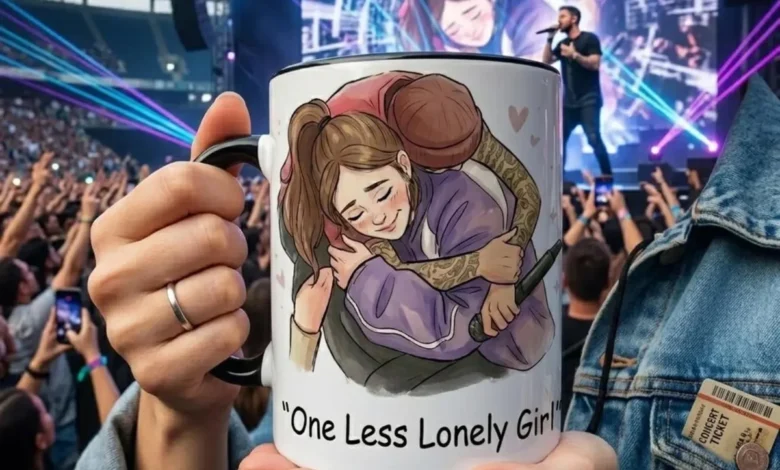
One popular design features a vintage-style graphic of Bieber and Eilish embracing on stage, often accompanied by the text "One Less Lonely Girl." These T-shirts, available in various colorways and sizes, cater to fans seeking a tangible reminder of the collaboration. Another notable item is a graphic tee that prominently displays "Bieberchella" alongside imagery from the performance. These fan-made creations not only reflect the excitement surrounding the event but also highlight the entrepreneurial spirit of the fanbase, who are adept at transforming cultural moments into wearable art.
Beyond apparel, coffee mugs featuring illustrated depictions of the Coachella encounter have also emerged. These ceramic items, offered in different sizes and colors, provide a more everyday way for fans to celebrate the artists and their shared history. The rapid proliferation of these products demonstrates the immediate commercial impact of high-profile celebrity collaborations and the power of fan culture in driving trends.

Analyzing the Fan-Made Merchandise Landscape
The surge in fan-made merchandise can be attributed to several factors. Firstly, the timing of the collaboration, occurring at a globally recognized festival, provided a high-visibility platform. Secondly, the existing strong fan bases of both Justin Bieber and Billie Eilish created an immediate and dedicated market. Bieber’s "Beliebers" and Eilish’s "Eyelashes" (a playful nickname for her fans) have a history of passionate engagement with their idols.
The accessibility of platforms like Etsy has significantly lowered the barrier to entry for independent creators. This allows for rapid prototyping and distribution of merchandise that directly taps into trending cultural moments. The affordability and unique nature of these fan-made items often appeal to consumers seeking alternatives to official, mass-produced merchandise. This phenomenon also speaks to a broader trend in consumer behavior, where authenticity and connection to cultural events are highly valued.
Official Merchandise and the Legacy of "My World"
While fan-made items quickly flooded the market, the enduring appeal of Justin Bieber’s early career is also reflected in the availability of official merchandise. Amazon, for instance, features official Justin Bieber T-shirts from his My World era. These items, often featuring promotional imagery from that period, offer a direct connection to Bieber’s formative years as a global pop sensation. The continued sale of these retro-themed items underscores the long-term impact of his debut EP and the loyalty of his established fanbase.

The inclusion of official merchandise alongside fan-made creations in retail discussions highlights the multifaceted nature of celebrity-driven commerce. It showcases how both official channels and independent creators can coexist, catering to different segments of the consumer market while celebrating the same cultural touchstones.
A History of Artistic Cross-Pollination
The Coachella appearance was not the first instance of Justin Bieber and Billie Eilish collaborating. In 2019, Bieber made a surprise appearance on a remix of Eilish’s hit song "Bad Guy." This earlier collaboration signaled a growing respect and admiration between the two artists, even before their memorable Coachella duet. Eilish, who was a young fan during Bieber’s initial rise to fame, has often spoken about his influence on her early musical aspirations. This history of artistic interaction adds a layer of depth to their public appearances, suggesting a genuine connection that resonates with their respective fan bases.
The enduring impact of this Coachella moment extends beyond the immediate merchandise sales. It serves as a testament to the power of live music events to create unforgettable cultural moments and to foster a sense of shared experience among fans. The convergence of two distinct but equally influential artists on one of the world’s most prominent stages has undoubtedly left an indelible mark on the landscape of contemporary pop music. The swift creation of commemorative merchandise is a direct reflection of this impact, allowing fans to carry a piece of this historic collaboration with them.