Animation Apps For Ipad
The Ultimate Guide to Animation Apps for iPad: Unleash Your Creativity on the Go
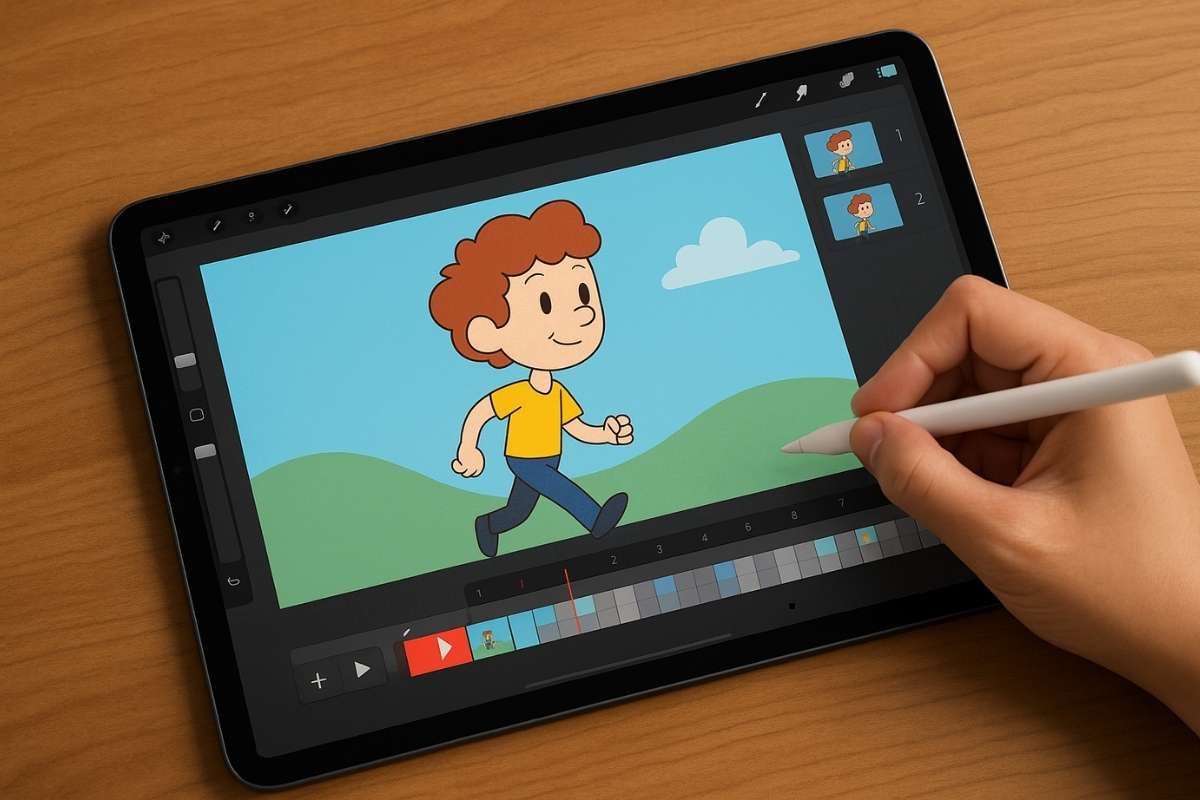
The iPad has evolved from a simple tablet into a powerful creative hub, and for aspiring animators, it offers an accessible and versatile platform. Gone are the days when animation was confined to bulky desktops and expensive software. Today, a plethora of animation apps for iPad empower individuals to bring their ideas to life, whether they’re sketching their first character or producing complex 2D narratives. This comprehensive guide delves into the top animation apps available for iPad, exploring their features, target audiences, and what makes them stand out in the competitive landscape. We’ll cover everything from beginner-friendly tools to professional-grade software, ensuring you find the perfect fit for your animation journey.
Procreate: More Than Just a Drawing App for Animation
While Procreate is primarily renowned for its exceptional digital painting and illustration capabilities, its powerful animation features have made it a darling for many 2D animators. Its intuitive interface, coupled with a robust set of drawing tools, makes it surprisingly adept at frame-by-frame animation. Procreate’s animation assist feature displays onion skins of previous and subsequent frames, allowing for seamless drawing and precise timing. The playback functionality is smooth, enabling animators to preview their work in real-time. Users can customize frame rates, duplicate frames, and even add layers for more complex compositions. The extensive brush library, a hallmark of Procreate, also translates beautifully to animation, offering a vast array of textures and styles to imbue your characters and scenes with personality. For those already familiar with Procreate for illustration, transitioning to animation feels natural, offering a low barrier to entry. Its affordability and one-time purchase model make it an incredibly attractive option for hobbyists and emerging artists. The ability to export animations as GIFs or short videos further streamlines the workflow, making it easy to share creations across platforms. While it doesn’t offer advanced features like character rigging found in dedicated animation software, Procreate excels at hand-drawn, expressive animation where artistic control is paramount.
FlipaClip: The Go-To for Traditional 2D Animation on iPad
FlipaClip has cemented its reputation as one of the most accessible and beloved animation apps for iPad, particularly for those interested in traditional frame-by-frame animation. Its interface is deliberately designed to mimic the feel of a physical flipbook, making the animation process incredibly intuitive, especially for beginners. The app provides essential tools for creating animations, including a drawing canvas, a timeline, onion skinning to visualize previous and next frames, and the ability to import audio for sound synchronization. FlipaClip supports various drawing tools, including brushes, pencils, erasers, and fill tools, allowing for creative expression. Users can adjust frame rates, duplicate and delete frames, and organize their animation sequences with ease. A significant advantage of FlipaClip is its freemium model; a substantial portion of its features are available for free, with optional paid upgrades unlocking additional tools, layers, and export options. This accessibility has fostered a massive community of young animators and hobbyists who use FlipaClip to create everything from short cartoons to animated memes. The ease with which one can learn and create animations in FlipaClip makes it an ideal starting point for anyone looking to explore the world of animation without a steep learning curve or significant financial investment. Export options include GIFs and MP4 videos, facilitating easy sharing of animated creations.
RoughAnimator: Bridging the Gap Between Sketching and Professional Animation
RoughAnimator positions itself as a powerful yet accessible tool for animators looking for more robust features than basic flipbook apps, without the overwhelming complexity of professional desktop software. It excels in providing a versatile environment for creating traditional 2D animation with a focus on fluid motion and detailed artwork. Key features include a comprehensive set of drawing tools, the ability to work with multiple layers, onion skinning for precise frame sequencing, and frame scrubbing for meticulous control over timing. RoughAnimator also offers advanced capabilities such as the ability to import audio files for lip-syncing and sound effects, a crucial element for bringing characters to life. Its timeline is well-structured, allowing for easy management of frames and their duration. The app supports various export formats, including sequences of images and video files, offering flexibility for further editing or direct sharing. A standout feature is its emphasis on a smooth animation workflow, with tools designed to facilitate the creation of dynamic and visually appealing movements. RoughAnimator is a strong contender for intermediate animators or those who have outgrown simpler apps and are seeking a more professional-grade experience on their iPad. The app’s affordability and dedicated focus on 2D animation make it a compelling choice for artists who value control and a streamlined creative process.
ToonSquid: A Professional 2D Animation Studio in Your Pocket
ToonSquid is a premium animation app that truly aims to bring a professional 2D animation studio experience to the iPad. It caters to animators who require a more sophisticated toolset for creating polished, narrative-driven animations. The app boasts a powerful drawing engine with a wide array of brushes and customization options, ensuring artistic freedom. Its animation workflow is highly refined, featuring an advanced timeline with control over frame durations, onion skinning with adjustable opacity, and the ability to create multiple animation scenes. ToonSquid also shines in its character animation capabilities, offering features like bone rigging, which allows for more complex and fluid character movements by defining joints and controlling their rotation. This is a significant advantage for animators looking to create more lifelike or stylized character performances. The app supports import and export of various file formats, including PSDs and industry-standard video codecs, facilitating integration into larger production pipelines. Its robust audio features allow for precise synchronization of sound and dialogue. While it comes with a higher price tag than some of its counterparts, ToonSquid’s comprehensive feature set, particularly its bone rigging and professional workflow, justifies the investment for serious animators and small studios looking for a powerful, portable animation solution.
Animation Desk: Feature-Rich Animation for All Levels
Animation Desk is a versatile and feature-rich animation app that caters to a broad spectrum of users, from absolute beginners to experienced animators. It strikes a balance between ease of use and advanced functionality, making it a compelling choice for various creative endeavors. The app’s core strength lies in its intuitive frame-by-frame animation workflow, complemented by a robust set of drawing tools. Users can choose from a variety of brushes, pens, and erasers, with extensive customization options for stroke size, opacity, and flow. Onion skinning is a core feature, allowing for smooth transitions and precise frame sequencing. Animation Desk also supports multiple layers, enabling the creation of complex scenes with foreground and background elements. A notable aspect is its built-in sound recording and editing capabilities, allowing for the addition of voiceovers, sound effects, and music to synchronize with the animation. The app offers various export options, including GIFs and videos in different resolutions, making it easy to share creations. Animation Desk’s user-friendly interface, coupled with its comprehensive feature set, makes it an excellent platform for exploring traditional animation techniques, creating short animated clips, or even developing more involved projects. Its accessibility, combined with its powerful tools, ensures that animators of all skill levels can find value and express their creativity effectively.
Origami: Seamless 2D Character Animation
Origami stands out as a specialized app designed for creating smooth and expressive 2D character animations with a focus on user-friendly rigging. While many apps offer basic animation tools, Origami’s strength lies in its intuitive approach to character manipulation. It allows users to draw their characters and then easily set up a bone structure, defining joints and connections. This rigging system enables animators to pose and move their characters with fluidity, creating natural and dynamic performances without needing to redraw every single frame for subtle movements. The app provides a timeline for sequencing poses and actions, along with onion skinning to help visualize the flow of movement. Origami’s interface is clean and focused, making the rigging and animation process accessible even for those new to character animation. It’s particularly well-suited for creating animated loops, character reactions, and simple narrative sequences where character performance is key. While it might not offer the extensive drawing tools of a general illustration app or the complex timeline management of a full-fledged production software, Origami excels in its niche, providing a powerful and efficient way to bring 2D characters to life on the iPad.
Stop Motion Studio: Bringing Physical Objects to Animated Life
Stop Motion Studio is the quintessential app for anyone interested in exploring the captivating world of stop-motion animation on their iPad. It transforms the tablet into a mobile stop-motion studio, making the process of capturing and editing frame-by-frame physical movements remarkably accessible. The app provides a clean and intuitive interface that guides users through the entire stop-motion workflow. Key features include a camera interface that allows for capturing individual frames, a timeline for organizing and sequencing those frames, and a powerful editing suite. The onion skinning feature is crucial for stop-motion, allowing animators to see a translucent overlay of the previous frame, ensuring smooth and consistent movement between shots. Users can adjust the playback speed, add titles and credits, and even incorporate background music and sound effects to enhance their creations. Stop Motion Studio also supports advanced features like remote capture via another device and green screen capabilities, opening up possibilities for more complex visual effects. The app’s ease of use, combined with its robust feature set, makes it ideal for hobbyists, educators, and anyone looking to experiment with bringing toys, clay figures, or any physical object to life through animation. Export options include various video formats, allowing for easy sharing of these tangible animated creations.
Key Considerations When Choosing an Animation App for iPad
When selecting an animation app for your iPad, several factors should influence your decision, ensuring the tool aligns with your skill level, project goals, and preferred animation style.
Target Audience and Skill Level: Are you an absolute beginner looking to experiment with the basics of frame-by-frame animation, or an experienced animator seeking advanced features like rigging and complex timeline control? Apps like FlipaClip and Animation Desk are excellent for beginners, offering intuitive interfaces and accessible features. Procreate, while also accessible, caters to artists already familiar with its drawing tools. For intermediate to advanced users seeking more control and professional capabilities, RoughAnimator and ToonSquid are strong contenders. Stop Motion Studio is specifically for those interested in physical stop-motion.
Animation Style and Features: The type of animation you intend to create will heavily dictate the best app. Traditional frame-by-frame animation is well-supported by Procreate, FlipaClip, RoughAnimator, and Animation Desk. For character-centric animation with more fluid movement, apps with rigging capabilities like ToonSquid are invaluable. If your passion lies in bringing physical objects to life, Stop Motion Studio is the clear choice. Consider features like onion skinning intensity and control, layer management, brush variety and customization, audio integration, and the ability to import/export specific file formats.
User Interface and Workflow: A user-friendly interface is paramount, especially when you’re spending significant time creating. Explore the app’s layout, the ease of accessing tools, and how intuitive the animation process feels. A smooth workflow can significantly impact your productivity and enjoyment. Many apps offer free versions or trials, allowing you to test the interface before committing to a purchase.
Cost and Monetization Model: Animation apps on iPad range from free with in-app purchases to one-time purchase premium applications. Free apps like FlipaClip offer a fantastic entry point, while paid apps often provide a more comprehensive and unrestricted feature set. Consider your budget and whether a subscription model or a one-time purchase is more suitable for your needs.
Export Options and Compatibility: Ensure the app allows you to export your animations in formats that are compatible with your intended platforms or further editing software. Common export options include GIFs, MP4 videos, and image sequences (like PNG or JPG). Compatibility with cloud storage services or file-sharing apps can also be a crucial consideration for managing your projects.
Community and Support: For some users, a strong community and readily available support can be a significant advantage. Online forums, tutorials, and active developer communities can provide assistance, inspiration, and solutions to common problems, enhancing your overall learning and creative experience.
The Future of iPad Animation
The trajectory of animation apps on the iPad is one of continuous innovation and increasing sophistication. As Apple’s hardware becomes more powerful, with advancements in processing capabilities, stylus technology (Apple Pencil), and display quality, the potential for what can be achieved on an iPad continues to expand. We can anticipate further integration of AI-powered tools to assist with tasks like in-betweening or rotoscoping, making animation more efficient. Cloud-based collaboration features are likely to become more prevalent, allowing teams to work together on projects regardless of their physical location. The development of more advanced 3D animation capabilities on the iPad, while still nascent, is also a possibility, blurring the lines between 2D and 3D workflows. As the accessibility and power of these tools grow, the iPad is poised to become an even more dominant platform for animators of all levels, democratizing animation creation and fostering a new generation of digital storytellers. The evolution of these apps signifies a shift towards a more portable, intuitive, and powerful creative ecosystem, making animation more accessible and exciting than ever before.





/cdn.vox-cdn.com/uploads/chorus_image/image/65977824/Screen_Shot_2019_12_27_at_2.14.53_PM.0.png)

