LG Monitor App Installer Sparks Widespread Privacy and Bloatware Concerns Among Users and Tech Experts

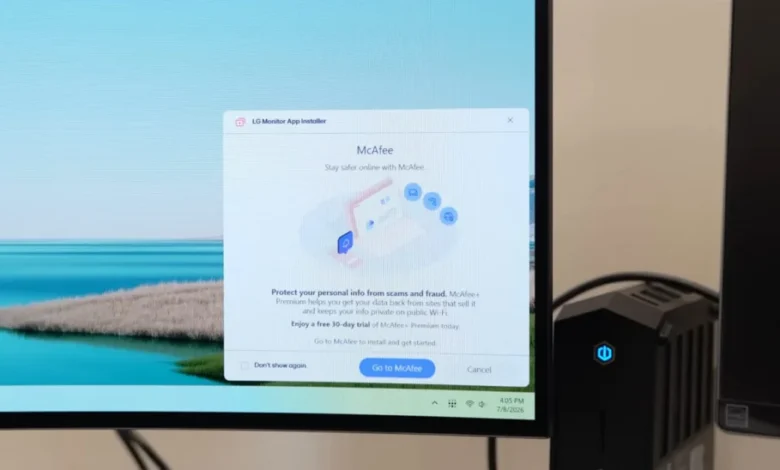
A growing controversy surrounds LG Electronics as numerous users report the unprompted and unconsented installation of the "LG Monitor App Installer" and its associated advertisements on their Windows systems, raising significant privacy concerns and questions about the practices of premium hardware manufacturers and the policies of operating system providers. This unexpected software intrusion is particularly jarring for customers who have invested in LG’s high-end monitors, some costing upwards of $1,000, only to find their systems cluttered with unrequested applications and disruptive ads. The gravity of the situation is compounded by the extensive permissions the application reportedly acquires upon installation, including access to "all system resources" and the ability to "collect geolocation, device data, online activity, contacts, user credentials, transactions, and more," according to Burke, a source cited in the ongoing discussion.
The Unwelcome Intrusion: Details of the LG Monitor App Installer
The core of the issue lies in the discovery by users that the LG Monitor App Installer, and subsequently ads for other software like McAfee, are appearing on their Windows PCs without any explicit prompt for permission or an opt-in process during initial setup or subsequent usage. This stealthy deployment of software is a significant departure from expected user experience, especially from a brand known for its premium electronics. Users, including Burke, have noted that this practice appears to have been ongoing for several years but has seemingly expanded in scope and visibility recently, with pop-up ads now appearing on monitors purchased as far back as three years ago. The installation method itself is opaque to the average user, often appearing as an update or an automatic installation process, blurring the lines between essential driver updates and marketing software.
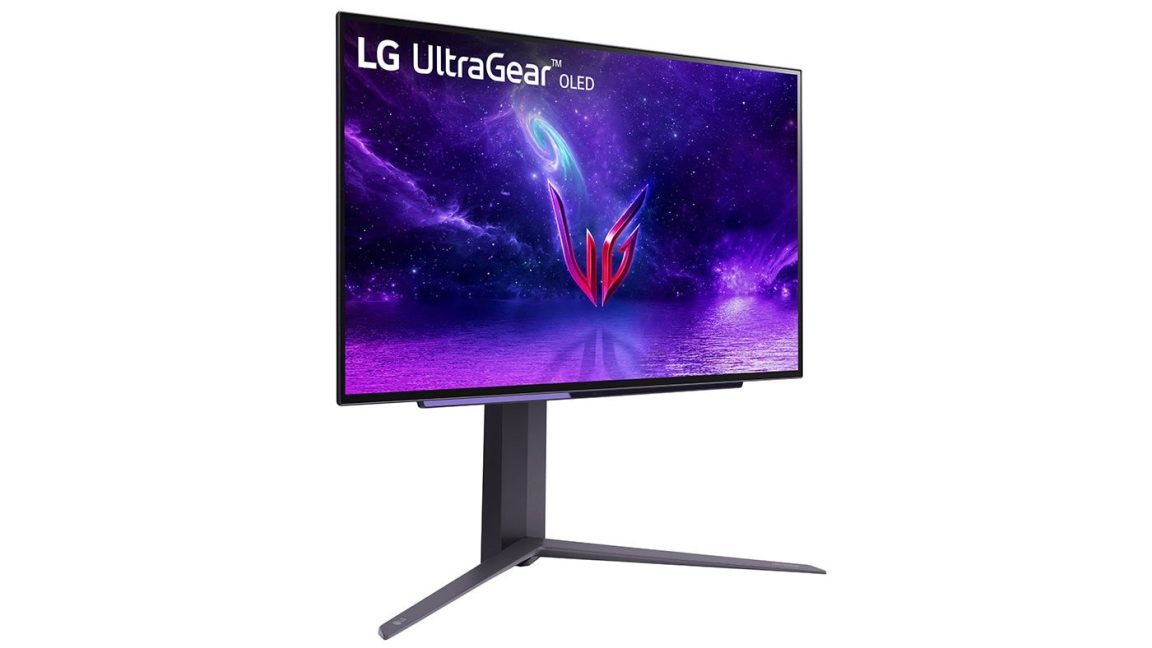
For many, the expectation when purchasing a high-cost monitor is a clean, focused display experience, free from the kind of software bundling often associated with lower-cost devices or free applications. The presence of an app that not only installs without consent but also then pushes advertisements fundamentally undermines this expectation. The economic context is crucial here: consumers paying a premium for hardware anticipate a premium experience, not one marred by intrusive marketing tactics that typically generate additional revenue streams for manufacturers through partnerships with software vendors. This directly impacts the perceived value and integrity of LG’s product line, particularly its acclaimed gaming and professional monitors.
Deep Dive into Privacy Implications and Data Collection
The most alarming aspect of the LG Monitor App Installer controversy revolves around the profound privacy implications. As detailed by Burke, the application, once installed, ostensibly gains permissions to an alarming array of personal and system data. The listed categories—geolocation, device data, online activity, contacts, user credentials, and transactions—represent a comprehensive dossier on a user’s digital life. Such extensive data collection, especially without clear, informed consent, directly conflicts with modern privacy principles and regulations like the General Data Protection Regulation (GDPR) in Europe and the California Consumer Privacy Act (CCPA) in the United States.
Device data can include specifications of the computer, installed software, and usage patterns. Online activity can encompass browsing history, app usage, and network interactions. User credentials and transaction data are particularly sensitive, raising potential security vulnerabilities and exposing users to risks of identity theft or financial fraud if such data were ever compromised. Even if LG claims this data is anonymized or used purely for analytics and service improvement, the sheer scope of information collected, combined with the lack of explicit user consent, creates a significant trust deficit. Consumers are increasingly wary of companies harvesting personal data, and such practices, when discovered, can lead to severe reputational damage and potential legal challenges. The argument that a monitor’s companion app requires such deep access to system resources and personal data is difficult to justify from a purely functional perspective, leading many to conclude that the primary motive is data monetization.
Microsoft’s Role and the UWP Device App Framework
The situation also casts a spotlight on Microsoft’s operating system policies, specifically concerning "Universal Windows Platform (UWP) device apps." Microsoft’s documentation for developers indicates that UWP device apps are designed "to automatically install when the user connects their device to the PC" under specific conditions. These conditions include the user not having opted out of "Recommended Settings" during Windows installation, being connected to the Internet, and being signed into the Microsoft Store. This policy, detailed on a Microsoft support page for Windows developers, explicitly states: "The automatic installation feature does not provide a notification to the user when the app is installed. Some users may find this experience confusing and frustrating and give your app a bad rating."
This statement from Microsoft itself acknowledges the problematic nature of silent installations, indicating that the company is aware of the potential for user dissatisfaction. While designed to streamline device setup and enhance user experience by automatically installing necessary drivers and companion software, the policy’s implementation clearly leaves a gaping loophole for manufacturers to install unwanted bloatware. The lack of explicit notification during installation is a critical failure in user transparency and control. For a peripheral like a monitor, which often functions perfectly well with generic drivers, the automatic installation of a proprietary app that then pushes ads and collects extensive data feels like an overreach enabled by Microsoft’s framework. This raises questions about Microsoft’s responsibility to safeguard its users from potentially intrusive practices by its hardware partners. The company’s stance on "Recommended Settings" as a default that enables such installations without further prompts places the onus on the user to proactively opt-out of a feature they might not even be aware exists or fully understand its implications.
A Pattern of Bloatware: Industry-Wide Precedent
The issue with LG is not an isolated incident but rather a recurring theme in the hardware industry. Several other prominent hardware vendors have faced similar criticism for automatically installing unwanted software or "bloatware" when their devices are connected to a computer. Examples include:
- Razer: Known for its gaming peripherals, Razer has been criticized for its Synapse software automatically installing and requiring extensive permissions.
- Logitech: A major player in gaming and productivity peripherals, Logitech’s companion software has also been flagged for intrusive installations.
- Asus: Motherboard manufacturers like Asus have bundled software that users find unnecessary and difficult to remove.
- Gigabyte: Another motherboard vendor, Gigabyte, has also faced backlash for silently installing bloatware.
While these instances are problematic, the case of LG’s monitor app is particularly egregious given the nature of the device. Unlike a gaming mouse or keyboard that might genuinely benefit from advanced customization software (though even then, consent should be paramount), a monitor typically requires minimal software interaction beyond basic display drivers. The primary function of a monitor is to display an image; it rarely necessitates a comprehensive companion application that delves deep into system resources and user data. This makes the forced installation of the LG Monitor App Installer, especially on expensive, premium displays, seem like an unnecessary and aggressive push for data collection and ad revenue, eroding consumer trust in a fundamental way.
Chronology of Concerns and Community Response
While a precise, detailed timeline is challenging to construct from the provided snippet, a general chronology of the emerging concerns can be inferred:
- Several Years Ago: The practice of LG’s app installations likely began, as Burke reported seeing pop-up ads on monitors purchased three years prior, indicating a longstanding issue.
- Recent Expansion: Users have noted a recent increase in the visibility and intrusiveness of these pop-up ads and installations, suggesting a more aggressive deployment strategy by LG.
- Wider Awareness: Tech enthusiasts and media outlets, notably Gamers Nexus, began to actively investigate and report on the issue, bringing it to a broader public audience. Gamers Nexus, a well-respected hardware review channel, played a crucial role by sharing screenshots and detailed analysis, legitimizing user complaints. Their investigation highlighted the mechanism of installation, often via Windows Update, making it appear as a legitimate system component.
- Media Outreach: Publications like Ars Technica reached out to LG for official comments, indicating the issue had gained significant journalistic traction.
The tech community’s reaction has been largely one of frustration and disappointment. Forums, social media, and comment sections across tech news sites have been filled with users sharing similar experiences, expressing anger over the lack of transparency, and demanding accountability from LG and Microsoft. The consensus among many is that such practices are unacceptable, particularly from companies that market themselves as premium brands.
LG’s Silence and the Path Forward
As of the latest reports, LG has acknowledged receipt of inquiries from media outlets like Ars Technica regarding the purpose of the LG Monitor App Installer, the specific monitors affected, and the pressing privacy concerns. However, a company representative did not provide an official response ahead of publication. This silence, while potentially indicating that LG is formulating a comprehensive statement, also contributes to user frustration and fuels speculation. In such situations, a prompt and transparent response is crucial for maintaining customer trust.
Moving forward, several key actions and considerations are imperative:
- LG’s Accountability: LG must provide a clear explanation for the automatic installation of the LG Monitor App Installer, justify its extensive data collection permissions, and outline steps to ensure explicit user consent for any future software installations or data harvesting. They should also provide an easy, straightforward method for users to uninstall the application and opt-out of any associated services permanently.
- Microsoft’s Policy Review: Microsoft should re-evaluate its Universal Windows Platform device app auto-installation policies. While aiming for convenience, the current implementation clearly undermines user control and privacy. Stricter requirements for explicit user notification and consent, especially for apps that collect extensive data or push advertisements, are necessary. A more granular control system, allowing users to differentiate between essential drivers and optional companion software, would be a welcome improvement.
- Consumer Advocacy: Consumer protection agencies and privacy watchdogs may need to investigate these practices to determine if they violate existing data protection laws or consumer rights. The lack of transparency and consent could lead to regulatory action, particularly in regions with strong privacy frameworks.
- Industry Standards: The broader hardware industry needs to establish clearer ethical guidelines regarding companion software. The trend of monetizing users beyond the initial hardware purchase through data collection and advertising risks eroding the foundational trust between manufacturers and consumers.
- User Empowerment: In the interim, users should be vigilant about reviewing installed applications, checking privacy settings, and being aware of the "Recommended Settings" during Windows installation. Tools for monitoring system processes and network activity can help identify unexpected software behavior.
The LG Monitor App Installer incident serves as a stark reminder that the digital privacy landscape extends beyond operating systems and web browsers, reaching into the very hardware we purchase. As our devices become more interconnected and sophisticated, the onus on manufacturers to uphold ethical practices and respect user autonomy becomes ever more critical. The resolution of this controversy will set an important precedent for how hardware companies interact with their customers’ systems and data in the future.