Best WordPress Crm Plugins

Top WordPress CRM Plugins: Streamline Your Business and Boost Sales
WordPress, a dominant force in website creation, offers a robust ecosystem of plugins to extend its functionality. For businesses, integrating Customer Relationship Management (CRM) capabilities directly into their WordPress site can be a game-changer, centralizing customer data, automating tasks, and fostering stronger client relationships. This article delves into the best WordPress CRM plugins available, providing in-depth analysis and SEO-friendly insights to help you choose the optimal solution for your business needs. We will explore their core features, pricing models, ease of use, integration capabilities, and target audience, enabling informed decision-making for enhanced customer engagement and sales growth.
HubSpot CRM for WordPress
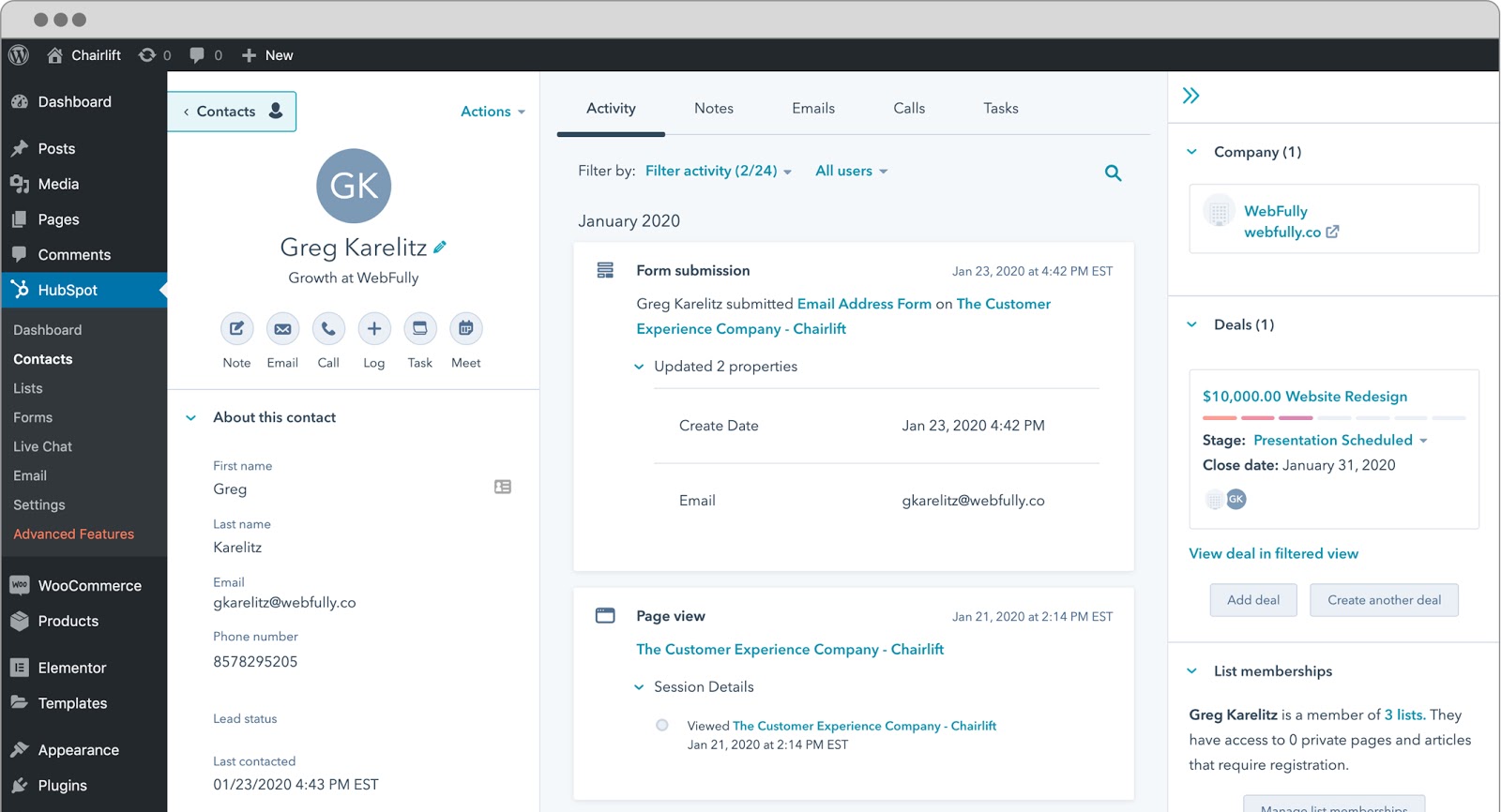
HubSpot CRM for WordPress stands out as a powerful, all-in-one solution, particularly appealing to businesses of all sizes seeking comprehensive lead management and marketing automation. The plugin seamlessly integrates with your WordPress website, offering a free tier that is remarkably feature-rich, making it an excellent starting point for budget-conscious businesses. Its core functionality revolves around a robust contact database, allowing you to store detailed customer information, track interactions, and segment your audience effectively. The plugin facilitates deal tracking, enabling you to visualize your sales pipeline and manage opportunities through various stages.
One of HubSpot’s significant advantages is its built-in marketing tools. This includes email marketing capabilities, allowing you to design and send targeted campaigns directly from your WordPress dashboard. Form creation is intuitive, and these forms can be easily embedded on your website to capture leads. The plugin also offers live chat functionality, enabling real-time engagement with website visitors, and basic reporting dashboards to monitor your sales and marketing performance. For businesses looking to scale, HubSpot offers paid tiers with progressively advanced features, including marketing automation workflows, advanced analytics, and more extensive customer service tools. The integration with other HubSpot marketing products is a major draw for those already invested in the HubSpot ecosystem. Its user interface is generally considered clean and intuitive, reducing the learning curve for new users. The free version is incredibly generous, offering substantial value without immediate financial commitment.
WP-CRM
WP-CRM presents a more developer-centric and highly customizable CRM solution for WordPress. This plugin is ideal for businesses that require granular control over their customer data and want to build a CRM tailored to their specific workflows. Unlike some of its competitors, WP-CRM focuses on providing a flexible framework that can be adapted to a wide range of business processes. Its core strength lies in its extensive customization options. You can create custom fields to capture any type of customer information relevant to your business, from standard contact details to highly specific industry metrics.
The plugin allows for the management of user roles and permissions, ensuring that only authorized personnel can access and modify sensitive customer data. WP-CRM also supports the creation of custom modules, which can be used to track anything from projects and tasks to support tickets and invoices. Its reporting capabilities are also highly customizable, allowing you to generate reports based on the specific data you’ve collected. While WP-CRM offers a free base plugin, its true power is unlocked through a variety of premium add-ons, which cater to specific functionalities such as advanced reporting, billing, project management, and more. This modular approach means you only pay for the features you need, making it a cost-effective solution for businesses with unique requirements. The learning curve can be steeper for less technical users due to its extensive customization, but for those willing to invest the time, WP-CRM offers unparalleled flexibility.
Agile CRM
Agile CRM is a cloud-based CRM solution that offers a dedicated WordPress plugin to seamlessly integrate its robust features into your website. This plugin caters to small and medium-sized businesses (SMBs) looking for a comprehensive suite of sales, marketing, and customer service tools without the complexity of enterprise-level solutions. Agile CRM’s strength lies in its all-in-one approach, aiming to be a central hub for all customer interactions. The WordPress plugin allows you to sync leads captured through your website forms directly into your Agile CRM database.
Key features include contact management, lead scoring, sales pipeline management, and marketing automation. The plugin enables you to schedule appointments, track sales activities, and manage your deals effectively. For marketing, Agile CRM offers email campaign management, landing page creation, and social media integration. The customer service aspect is supported by a ticketing system and knowledge base features. Agile CRM operates on a freemium model. The free plan is quite generous, supporting up to 10 users and offering core CRM functionalities. Paid plans introduce more advanced features like marketing automation, telephony integration, and increased API access, scaling with your business growth. The plugin’s integration is generally straightforward, and the Agile CRM platform itself is known for its user-friendly interface, making it accessible to teams with varying technical proficiencies.
CRM Per Sonne (CRM for Personalization)
CRM Per Sonne, often shortened to CRM, is a powerful and versatile WordPress CRM plugin that emphasizes deep personalization and granular control over customer data. This plugin is an excellent choice for businesses that require a highly tailored CRM experience, allowing them to meticulously manage customer interactions and tailor their communication. Its core strength lies in its ability to create custom fields and user roles with exceptional precision. This means you can capture and organize data precisely as your business operates, moving beyond generic contact fields to specific attributes relevant to your industry and client base.
The plugin facilitates the creation of custom modules, enabling you to track various aspects of your business, from project management and support tickets to product interests and interaction history. This level of customization ensures that your CRM is not just a data repository but a dynamic tool that supports your unique workflows. CRM Per Sonne also excels in its permission management system, allowing administrators to define intricate access levels for different user roles, ensuring data security and integrity. Reporting capabilities are a strong suit, allowing you to build custom reports based on the extensive data you collect, providing actionable insights into customer behavior and sales performance.
While CRM Per Sonne offers a free version with a solid foundation of features, its true power is unlocked through a range of premium add-ons. These add-ons extend its functionality into areas like advanced reporting, e-commerce integration, email marketing automation, and more. This modular approach allows businesses to build a custom CRM solution that precisely fits their needs and budget. The learning curve can be moderate due to its extensive customization options, but for businesses prioritizing a bespoke CRM experience, CRM Per Sonne is a top contender. The plugin’s emphasis on user segmentation and personalized communication makes it invaluable for fostering stronger customer relationships and driving targeted marketing efforts.
Groundhogg
Groundhogg is a comprehensive marketing automation and CRM plugin designed to empower small businesses and entrepreneurs within the WordPress ecosystem. It aims to provide a powerful yet user-friendly platform for managing contacts, automating marketing campaigns, and nurturing leads without requiring external services. Groundhogg’s strength lies in its integrated approach, combining CRM functionalities with sophisticated marketing automation tools. The plugin allows you to build a centralized database of your contacts, track their interactions with your website and marketing efforts, and segment them based on various criteria.
The marketing automation features are a significant draw. Groundhogg enables you to create visual funnels, design email sequences, and automate follow-up communications based on user behavior. This can include sending welcome emails, abandoned cart reminders, or personalized offers. The plugin also supports the creation of custom forms and surveys to capture lead information and gather customer feedback. Furthermore, Groundhogg includes features for managing appointments, creating membership sites, and even basic e-commerce integrations. It offers a free version with essential features suitable for smaller operations. Paid plans unlock advanced features such as more advanced automation workflows, additional integrations, and increased capacity. The interface is designed to be intuitive, with a drag-and-drop funnel builder that simplifies the creation of complex automation sequences. Groundhogg is particularly well-suited for businesses that want to handle their CRM and marketing automation entirely within WordPress.
Salesforce for WordPress (via integrations)
While Salesforce itself is not a direct WordPress plugin, its immense power and market dominance necessitate its inclusion. Businesses leveraging Salesforce for their CRM can integrate it with their WordPress website through various official and third-party connectors. This approach allows you to harness the full capabilities of Salesforce – its robust sales automation, service cloud, marketing cloud, and extensive analytics – while seamlessly capturing leads and customer interactions from your WordPress site.
The integration typically works by using WordPress plugins that act as bridges, syncing data bidirectionally between your website and Salesforce. This means forms submitted on your WordPress site can automatically create or update leads and contacts in your Salesforce account. Website activity, such as page views or form submissions, can be tracked and associated with customer records in Salesforce. This level of integration is crucial for businesses that have already invested heavily in the Salesforce ecosystem and want to ensure a unified view of their customer journey.
The benefits of this integration are immense. It ensures data consistency across platforms, eliminates manual data entry, and allows your sales and marketing teams to work with real-time, accurate customer information. It unlocks Salesforce’s advanced reporting and forecasting capabilities for all leads originating from your WordPress site. However, it’s important to note that this solution requires a Salesforce subscription, which can be a significant investment. The complexity of setting up and maintaining the integration can also be higher than with native WordPress CRM plugins. However, for larger enterprises or businesses that rely on Salesforce for their core operations, integrating it with WordPress provides unparalleled power and a unified customer management strategy. The choice of integration plugin will depend on your specific Salesforce edition and the features you need to synchronize.
Zoho CRM for WordPress
Zoho CRM offers a powerful and scalable solution for businesses of all sizes, and its dedicated WordPress plugin ensures seamless integration with your website. Zoho CRM is renowned for its comprehensive feature set, covering sales, marketing, and customer support, making it a strong contender for businesses seeking an all-in-one CRM platform. The WordPress plugin allows you to capture leads from your website forms and sync them directly into your Zoho CRM account. This eliminates manual data entry and ensures that your sales team has access to the latest prospect information.
Key features of Zoho CRM include lead and contact management, sales forecasting, workflow automation, and performance analytics. The plugin facilitates the tracking of customer interactions, from initial contact to conversion, providing valuable insights into the customer journey. Zoho CRM also offers robust marketing automation capabilities, including email campaigns, social media integration, and event management, all of which can be initiated or tracked through your WordPress site. For customer service, it provides ticketing and case management features. Zoho CRM operates on a freemium model. The free plan is suitable for small teams, offering core CRM functionalities. Paid plans scale up to include advanced features like territory management, custom modules, and enhanced analytics, catering to growing businesses. The integration is generally straightforward, and Zoho CRM’s interface is known for its user-friendliness and customizability. This makes it accessible for teams with varying levels of technical expertise.
Choosing the Right WordPress CRM Plugin
The selection of the best WordPress CRM plugin hinges on a multitude of factors specific to your business. Budget is a primary consideration; free options like HubSpot CRM and the base versions of WP-CRM and Groundhogg offer substantial value, while paid solutions or those with premium add-ons like Zoho CRM and Agile CRM provide more advanced capabilities at a cost. Scalability is crucial – can the plugin grow with your business? Solutions like HubSpot and Zoho CRM offer tiered pricing, while WP-CRM’s modularity allows for phased expansion.
Ease of use is paramount, especially for smaller teams or those with limited technical resources. Plugins with intuitive interfaces, like HubSpot CRM and Groundhogg, minimize the learning curve. Conversely, highly customizable plugins like WP-CRM may require a greater time investment to master. Key features must align with your operational needs. If lead generation and form integration are paramount, HubSpot and Zoho CRM excel. For intricate data management and workflow customization, WP-CRM is a strong choice. If marketing automation is a priority, Groundhogg and Agile CRM offer robust solutions.
Integration capabilities are vital for a cohesive tech stack. Consider how well the CRM plugin integrates with your existing tools, such as email marketing services, e-commerce platforms, or accounting software. For businesses deeply invested in enterprise solutions, integrating with platforms like Salesforce via connectors might be the most effective approach. Finally, your target audience should influence your decision. A plugin that offers robust personalization and segmentation tools will be more beneficial for businesses with highly targeted marketing strategies. Thoroughly evaluating these aspects will empower you to select the WordPress CRM plugin that will most effectively streamline your operations, enhance customer relationships, and ultimately drive sales growth.