Google Analytics Social Media

Google Analytics for Social Media: Unlocking Deep Insights and Driving Growth
Understanding how social media drives traffic, conversions, and engagement to your website is paramount for any data-driven marketing strategy. Google Analytics, a powerful and free web analytics service, offers a robust suite of tools to meticulously track and analyze the performance of your social media efforts. This comprehensive guide delves into leveraging Google Analytics for social media, providing actionable insights and SEO-friendly strategies to maximize your return on investment.
Setting Up Social Media Tracking in Google Analytics
The foundation of effective social media analysis in Google Analytics lies in proper setup and configuration. The primary method for attributing traffic and conversions to specific social media platforms and campaigns is through UTM (Urchin Tracking Module) parameters. These are tags added to the end of your URLs, providing Google Analytics with detailed information about the source, medium, campaign, term, and content of the traffic.
Key UTM Parameters for Social Media:
utm_source: Identifies the referrer, such as "facebook," "twitter," "linkedin," "instagram," or "pinterest."utm_medium: Indicates the marketing medium used, commonly "social," "social media," or "paid social."utm_campaign: Specifies the specific campaign name, e.g., "summer_sale_2023," "new_product_launch," or "brand_awareness_campaign."utm_term: Used for paid search campaigns to identify keywords, but can be useful for specific social media targeting like "influencer_collab_jane_doe" or "contest_giveaway."utm_content: Differentiates similar content or links within the same ad or post, e.g., "video_ad_1," "image_post_cta," or "story_link."
Manually creating UTM parameters for every social media post can be tedious. Google offers a free Campaign URL Builder tool that simplifies this process. For automated generation, consider using spreadsheets or custom scripts for larger-scale operations. Ensure consistency in your naming conventions across all UTM parameters to maintain accurate reporting.
Beyond UTMs, ensure your Google Analytics tracking code is correctly implemented on all pages of your website. For enhanced insights, consider enabling Enhanced Ecommerce Tracking if you are an e-commerce business, as this allows for detailed analysis of social media’s impact on product views, add-to-carts, and purchases.
Key Google Analytics Reports for Social Media Analysis
Google Analytics provides several pre-built reports that are invaluable for understanding social media performance. Focusing on the right reports will yield the most impactful data.
1. Acquisition > All Traffic > Channels Report:
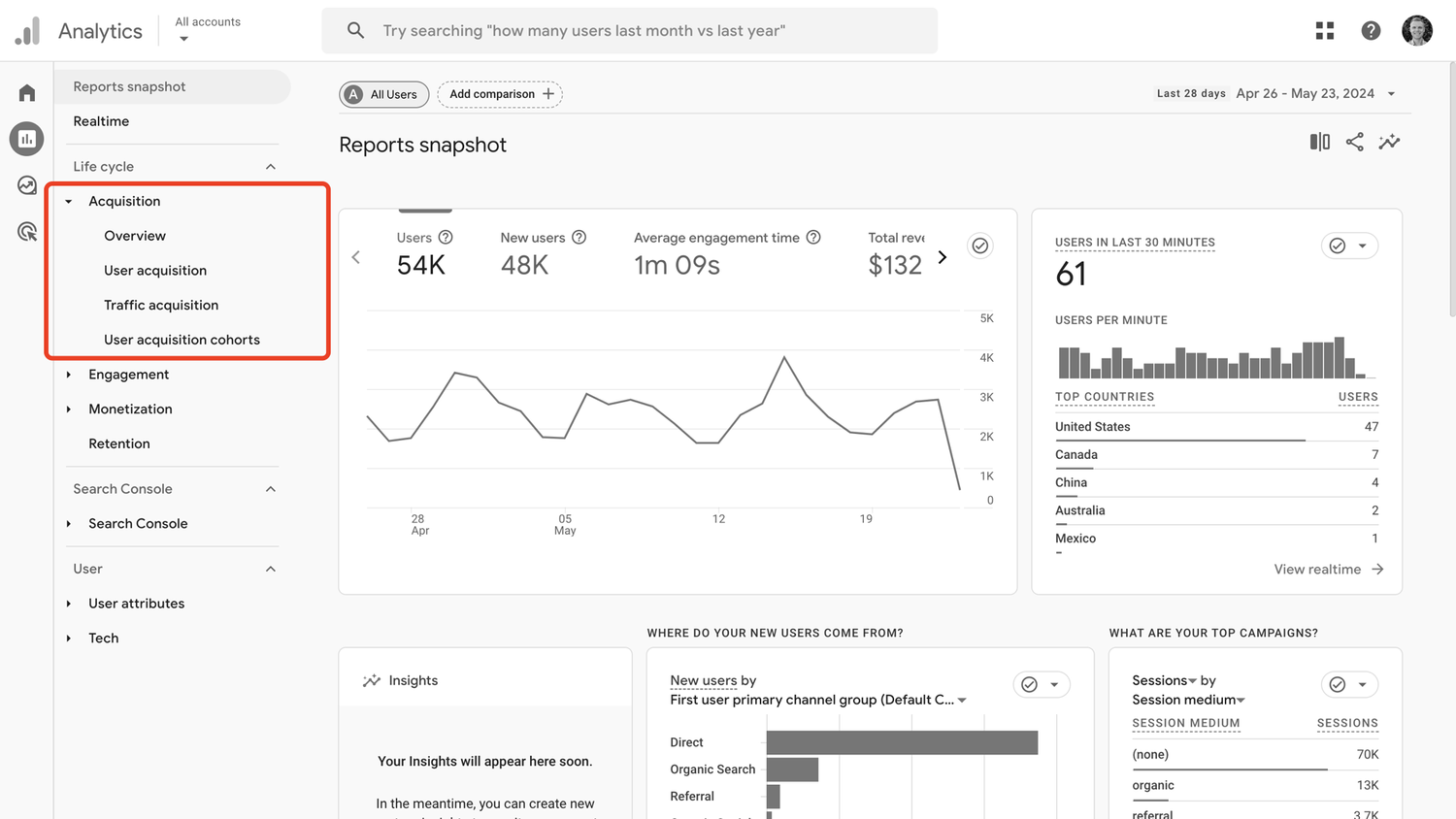
This is a fundamental report for understanding where your website traffic originates. In this report, look for the "Social" channel. This aggregated view provides a high-level overview of all social media traffic. You can see metrics like Users, New Users, Sessions, Bounce Rate, Pages/Session, and Avg. Session Duration. However, this report often lumps all social traffic together, limiting granular analysis.
2. Acquisition > Social Reports:
This dedicated section within Google Analytics offers a deeper dive into social media performance. It’s structured into several key sub-sections:
- Overview: Provides a summary of social media traffic, conversions, and engagement. It highlights top social networks driving traffic and the most popular landing pages from social referrals.
- Network Referrals: This report breaks down traffic by individual social networks (Facebook, Twitter, LinkedIn, etc.). You can analyze key metrics for each platform to understand which ones are most effective in driving visitors. This is where you’ll see the impact of your efforts on each specific platform.
- Landing Pages: Identifies which of your website pages are receiving the most traffic from social media. This is crucial for understanding which content resonates most with your social audience and where to focus your content creation efforts.
- Conversions: This report showcases the success of your social media efforts in achieving your defined goals, such as form submissions, purchases, or downloads. It’s vital to have goals set up in Google Analytics for this report to be meaningful.
- Plugins: This section (less relevant for direct social media traffic analysis but can provide context) tracks interactions with social sharing plugins on your website.
3. Acquisition > Campaigns > All Campaigns:
This report is critical for analyzing the effectiveness of your specific social media campaigns. By utilizing UTM parameters with utm_campaign, you can segment your social traffic and evaluate the performance of individual marketing initiatives. Here, you can see which campaigns are driving the most traffic, engagement, and conversions.
4. Behavior > Site Content > All Pages:
While not exclusively a social media report, analyzing this report with a segment for social media traffic (created using your UTMs or by filtering by the "Social" channel) can reveal which content is most popular among your social audience. This helps in understanding content preferences and optimizing your social content strategy.
5. Conversions > Goals > Overview/Goal URLs/Funnel Visualization:
If you have defined conversion goals in Google Analytics, these reports are indispensable. They allow you to attribute specific conversions to social media sources, channels, or campaigns. The Funnel Visualization is particularly useful for e-commerce to understand where social media traffic drops off in the purchase journey.
6. Conversions > Ecommerce > Product Performance (for e-commerce businesses):
This report, when filtered by social media traffic, shows which products are being viewed, added to cart, and purchased as a result of your social media efforts. This data is invaluable for product promotion and sales optimization on social platforms.
Analyzing Key Social Media Metrics in Google Analytics
Beyond simply looking at traffic volume, it’s essential to understand the quality of that traffic and its impact on your business objectives.
- Users and New Users: Indicates the reach of your social media efforts and your ability to attract new audiences.
- Sessions: The number of visits from social media to your website.
- Bounce Rate: The percentage of single-page sessions where users left your site without interacting further. A high bounce rate from social media might indicate that your landing page content doesn’t match user expectations or that the traffic is not highly qualified.
- Pages/Session: The average number of pages a user viewed during a session originating from social media. Higher numbers suggest engagement and exploration.
- Avg. Session Duration: The average time users spend on your website. Longer durations generally indicate greater interest.
- Goal Completions: The number of times users completed a defined goal after arriving from social media. This is a direct measure of your social media ROI.
- Conversion Rate: The percentage of sessions that resulted in a conversion. This is a key performance indicator for measuring the effectiveness of your social media in driving desired actions.
- Revenue (for e-commerce): The total revenue generated from social media traffic.
Leveraging Google Analytics for Social Media Strategy and Optimization
The data within Google Analytics is only valuable if it informs your strategic decisions. Here’s how to use it for optimization:
1. Identify Top Performing Platforms:
The "Network Referrals" report clearly shows which social networks are driving the most valuable traffic. Focus your efforts and budget on platforms that deliver the best results in terms of traffic, engagement, and conversions.
2. Optimize Content Strategy:
The "Landing Pages" report reveals which content is most popular with your social audience. Create more content similar to your top performers. Conversely, identify underperforming content and adjust your strategy or consider phasing it out.
3. Refine Campaign Targeting and Messaging:
The "Campaigns" report (using UTMs) helps you understand which specific social media campaigns are resonating. Analyze the performance of different ad creatives, copy, and targeting parameters. This data allows for A/B testing and continuous improvement of your paid social campaigns.
4. Understand User Behavior:
Analyze metrics like Bounce Rate, Pages/Session, and Avg. Session Duration for different social sources. A high bounce rate from a specific platform might suggest a mismatch between your social ad and landing page, or that the audience isn’t a good fit. Low session duration might indicate unengaging content.
5. Measure Social Media ROI:
By tracking Goal Completions and Revenue attributed to social media, you can directly measure the return on your social media investment. This data is crucial for justifying your social media budget and demonstrating its value to stakeholders.
6. Improve Website User Experience:
If social media traffic exhibits high bounce rates or low session durations, it could point to issues with your website’s user experience (UX) for that specific audience. Analyze their journey through the site to identify friction points and optimize accordingly.
7. Allocate Budget Effectively:
Data-driven decisions about where to invest your time and money in social media are essential. Understanding which platforms and campaigns yield the highest ROI allows for more efficient budget allocation.
Advanced Social Media Tracking and Analysis Techniques
Beyond the standard reports, Google Analytics offers more sophisticated ways to track and analyze social media.
- Creating Custom Segments: Segments allow you to isolate and analyze specific subsets of your data. Create segments for "Facebook Traffic," "Paid Twitter Campaigns," or "Influencer Marketing Traffic" to gain deeper, focused insights.
- Setting Up Custom Reports: Build custom reports tailored to your specific needs. For example, a custom report could show only social media traffic broken down by campaign and conversion goal completion.
- Integrating with Google Search Console: While not directly social media, understanding how social media influences branded search queries (visible in Search Console) can provide valuable context.
- Leveraging Google Tag Manager (GTM): GTM simplifies the implementation and management of tracking codes, including those for social media pixels and custom event tracking, making your analytics setup more robust and agile.
- Analyzing Social Media Mentions (Indirectly): While Google Analytics doesn’t directly track social media mentions, you can infer their impact by observing traffic spikes to your website following significant social media activity or viral content. Correlate these spikes with mentions in social listening tools.
Common Pitfalls and Best Practices
- Inconsistent UTM Tagging: This is the most common error. Stick to a consistent naming convention and ensure all team members are trained on its usage.
- Not Setting Up Goals: Without defined goals, you cannot effectively measure the conversion impact of social media.
- Over-reliance on Vanity Metrics: Likes and shares are important for engagement, but focus on metrics that directly impact your business objectives, such as conversions and revenue.
- Ignoring Mobile Performance: A significant portion of social media traffic comes from mobile devices. Ensure your website is mobile-friendly and analyze mobile user behavior from social sources.
- Failing to Act on Data: The most significant pitfall is gathering data without using it to inform your strategy. Regularly review your analytics and make adjustments.
By systematically implementing UTM parameters, regularly reviewing key Google Analytics reports, and acting on the data, businesses can transform their social media marketing from a guessing game into a precisely measured, growth-driving engine. The continuous cycle of analysis, strategy adjustment, and performance monitoring is the key to unlocking the full potential of social media within the Google Analytics framework.