Convert Json To Csv In Python
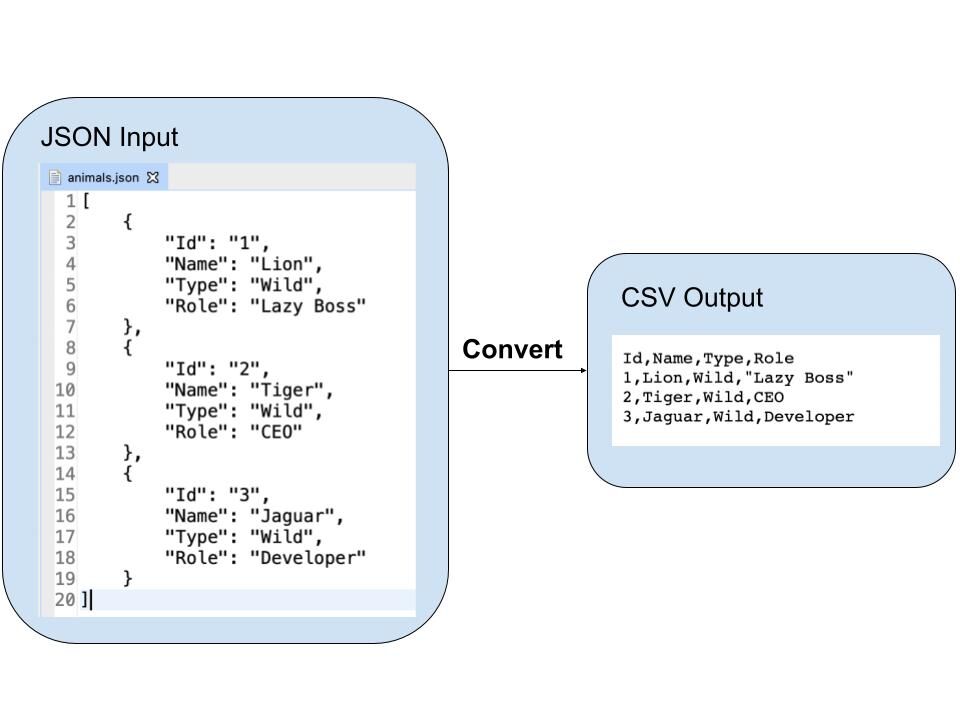

Convert JSON to CSV in Python: A Comprehensive Guide for Data Professionals
Converting JSON (JavaScript Object Notation) data to CSV (Comma Separated Values) format is a ubiquitous task in data processing, analysis, and migration. Python, with its robust standard libraries and extensive third-party packages, offers a streamlined and efficient solution for this conversion. This article delves into the intricacies of transforming JSON data into CSV using Python, covering various scenarios, best practices, and advanced techniques, all optimized for search engine visibility within the data science and programming communities.
The core of JSON to CSV conversion in Python revolves around parsing the JSON structure and then writing its contents into a tabular CSV format. JSON data can range from simple flat objects to deeply nested and complex structures, often containing arrays of objects. CSV, on the other hand, is inherently a tabular format, where each row represents a record and each column represents a field. The primary challenge in this conversion lies in handling the structural differences and ensuring data integrity during the transformation.
Python’s built-in json module is the cornerstone for parsing JSON data. This module provides functions like json.loads() to deserialize a JSON string into a Python dictionary or list, and json.load() to read JSON data directly from a file-like object. Once the JSON is loaded into Python objects, the csv module comes into play for writing the data to a CSV file. The csv module offers csv.writer() and csv.DictWriter() classes, which are essential for constructing CSV output. csv.DictWriter is particularly powerful when dealing with JSON objects that can be directly mapped to dictionary keys as CSV headers.
Let’s consider a basic JSON structure, an array of flat objects, for illustration. Suppose we have the following JSON data representing a list of users:
[
  {"id": 1, "name": "Alice", "email": "[email protected]"},
  {"id": 2, "name": "Bob", "email": "[email protected]"},
  {"id": 3, "name": "Charlie", "email": "[email protected]"}
]
To convert this to CSV, we would first load the JSON data using json.loads():
import json
import csv

json_data = """
[
  {"id": 1, "name": "Alice", "email": "[email protected]"},
  {"id": 2, "name": "Bob", "email": "[email protected]"},
  {"id": 3, "name": "Charlie", "email": "[email protected]"}
]
"""

data = json.loads(json_data)
Next, we can iterate through the list of dictionaries and write them to a CSV file. We need to identify the headers, which are the keys of the JSON objects. csv.DictWriter is ideal here because it automatically uses dictionary keys as headers.
csv_file_path = 'users.csv'
# Infer headers from the first dictionary if available
if data:
    headers = data[0].keys()
else:
    headers = [] # Handle empty JSON

with open(csv_file_path, 'w', newline='', encoding='utf-8') as csvfile:
    writer = csv.DictWriter(csvfile, fieldnames=headers)

    writer.writeheader()  # Write the header row
    for row in data:
        writer.writerow(row)
This simple script successfully converts a list of flat JSON objects into a CSV file. The newline='' argument in open() is crucial to prevent blank rows from appearing in the CSV file on some operating systems. The encoding='utf-8' ensures proper handling of a wide range of characters.
Handling nested JSON structures presents a more complex scenario. JSON allows for nested objects and arrays, which do not directly map to the flat, tabular structure of CSV. For instance, consider this JSON:
[
  {
    "id": 1,
    "name": "Alice",
    "address": {
      "street": "123 Main St",
      "city": "Anytown"
    },
    "tags": ["python", "data"]
  },
  {
    "id": 2,
    "name": "Bob",
    "address": {
      "street": "456 Oak Ave",
      "city": "Otherville"
    },
    "tags": ["javascript"]
  }
]
When converting nested structures, common strategies include:
- Flattening: Convert nested keys into a single string, often using a delimiter (e.g.,
address.street,address.city). Array elements can be joined into a string or represented in separate columns if the array size is consistent or if you want to create multiple rows for each element. - JSON string representation: Store the nested JSON object or array as a string within a single CSV cell. This preserves the original structure but makes it less amenable to direct tabular analysis.
- Exploding/Unnesting: Create multiple rows in the CSV for each element in a nested array. This is particularly useful for arrays of objects, where each object becomes a separate row, with other fields duplicated across these new rows.
Let’s focus on the flattening strategy, as it’s often preferred for analytical purposes. We can recursively traverse the JSON structure to extract all key-value pairs and construct a flattened dictionary.
def flatten_json(y):
    out = {}

    def flatten(x, name=''):
        if isinstance(x, dict):
            for a in x:
                flatten(x[a], name + a + '.')
        elif isinstance(x, list):
            # Option 1: Join list elements into a string
            # out[name[:-1]] = ', '.join(map(str, x))

            # Option 2: Handle list of objects by creating new rows (more complex)
            # For simplicity, we'll join for now. Complex list handling is addressed later.
            out[name[:-1]] = "; ".join(map(str, x))
        else:
            out[name[:-1]] = x

    flatten(y)
    return out

flattened_data = [flatten_json(record) for record in data]
The flatten_json function recursively processes dictionaries and lists. For dictionaries, it concatenates keys with a dot as a separator. For lists, it currently joins elements into a semicolon-separated string. A more sophisticated approach for lists of objects would involve unnesting, which we’ll explore.
After flattening, flattened_data would look like this (conceptually):
[
  {'id': 1, 'name': 'Alice', 'address.street': '123 Main St', 'address.city': 'Anytown', 'tags': 'python; data'},
  {'id': 2, 'name': 'Bob', 'address.street': '456 Oak Ave', 'address.city': 'Otherville', 'tags': 'javascript'}
]
Now, we can use csv.DictWriter again, but we need to be mindful of all possible flattened keys to create a comprehensive header. We can collect all unique keys from all flattened dictionaries.
all_headers = set()
for record in flattened_data:
    all_headers.update(record.keys())
sorted_headers = sorted(list(all_headers))

csv_file_path_flattened = 'users_flattened.csv'
with open(csv_file_path_flattened, 'w', newline='', encoding='utf-8') as csvfile:
    writer = csv.DictWriter(csvfile, fieldnames=sorted_headers)
    writer.writeheader()
    for row in flattened_data:
        # Ensure all keys exist for DictWriter, filling missing with empty strings
        writer.writerow({k: row.get(k, '') for k in sorted_headers})
This approach handles nested objects effectively. For arrays, joining elements into a string is a simple solution. However, if the array contains objects, or if you need to analyze each element of an array separately, a more advanced unnesting technique is required.
Consider a JSON structure where a key holds an array of objects, like a list of orders for a customer:
[
  {
    "customer_id": 101,
    "customer_name": "Eve",
    "orders": [
      {"order_id": "A1", "amount": 50.0},
      {"order_id": "B2", "amount": 75.5}
    ]
  },
  {
    "customer_id": 102,
    "customer_name": "Frank",
    "orders": [
      {"order_id": "C3", "amount": 120.0}
    ]
  }
]
To represent this in CSV, we can "explode" the orders array. Each order will become a separate row, duplicating the customer information.
import pandas as pd
import json

json_data_orders = """
[
  {
    "customer_id": 101,
    "customer_name": "Eve",
    "orders": [
      {"order_id": "A1", "amount": 50.0},
      {"order_id": "B2", "amount": 75.5}
    ]
  },
  {
    "customer_id": 102,
    "customer_name": "Frank",
    "orders": [
      {"order_id": "C3", "amount": 120.0}
    ]
  }
]
"""

data_orders = json.loads(json_data_orders)

# Using pandas for efficient unnesting
df = pd.DataFrame(data_orders)

# Explode the 'orders' column
# The 'orders' column contains dictionaries, so we first convert them to a DataFrame
# and then explode.
df_orders = df['orders'].apply(pd.Series).stack().reset_index(level=1, drop=True)
df_orders.columns = ['order_details'] # Rename for clarity

# Now, concatenate the exploded orders with the original DataFrame (excluding the 'orders' column)
df_exploded = df.drop('orders', axis=1).join(df_orders)

# The 'order_details' column is still a dictionary. Explode it further.
# We can create new columns for each key in the order_details dictionary.
df_exploded_orders = pd.json_normalize(df_exploded['order_details'])

# Join the normalized order details back to the main dataframe
df_final = df_exploded.drop('order_details', axis=1).join(df_exploded_orders)

csv_file_path_orders = 'customer_orders.csv'
df_final.to_csv(csv_file_path_orders, index=False, encoding='utf-8')
This pandas-based approach is highly effective for handling complex nested arrays. pd.json_normalize() is particularly useful for flattening nested JSON structures into a flat table, making it ideal for direct conversion to CSV.
When dealing with very large JSON files that might not fit into memory, stream processing becomes essential. Python’s ijson library (or json with careful file handling) can be used for this. ijson allows you to parse JSON incrementally.
import ijson
import csv

json_file_path = 'large_data.json'
csv_file_path_stream = 'large_data_streamed.csv'

# Assuming JSON is an array of objects, we'll process items at the root level
# i.e., root is an array and we want to process its items.
# The prefix 'item' targets each element within the root array.
prefix = 'item'

with open(json_file_path, 'rb') as infile,
     open(csv_file_path_stream, 'w', newline='', encoding='utf-8') as outfile:

    # Initialize variables to store headers
    headers_written = False
    all_headers = set()

    # Use ijson.items to iterate over items in the JSON array
    # 'all_items' will yield each object in the root array
    parser = ijson.items(infile, prefix)

    # We need to collect all possible headers first before writing
    # This requires a preliminary pass or a more complex state management.
    # For simplicity here, let's assume a known schema or perform a two-pass
    # for dynamic header discovery if the schema is not consistent.

    # If dynamic header discovery is needed, you'd typically iterate once to get all keys
    # and then iterate again to write. Or, maintain a set of all seen keys.

    # A common strategy is to iterate through a sample or the first N items
    # to determine headers if schema is not guaranteed. For simplicity, let's
    # assume we can determine headers from the first few or an external definition.

    # A practical approach for stream processing with dynamic headers:
    # 1. Read a few records to infer potential headers.
    # 2. Write headers.
    # 3. Continue streaming and writing data, adding new headers if encountered.

    # Let's refine this for a more robust streaming approach with dynamic headers.

    # Temporary storage for records to determine headers
    temp_records = []
    MAX_TEMP_RECORDS = 1000 # Adjust as needed

    records_to_process = []

    try:
        for record in parser:
            records_to_process.append(record)
            all_headers.update(record.keys())
            if len(records_to_process) >= MAX_TEMP_RECORDS:
                break # Stop after collecting enough records to infer headers
    except ijson.common.IncompleteJSONError:
        # Handle cases where the file might be smaller than MAX_TEMP_RECORDS
        pass

    sorted_headers = sorted(list(all_headers))

    writer = csv.DictWriter(outfile, fieldnames=sorted_headers)
    writer.writeheader()

    # Write the initially collected records
    for record in records_to_process:
        writer.writerow({k: record.get(k, '') for k in sorted_headers})

    # Continue processing the rest of the file
    # We need to re-initialize the parser, which can be tricky.
    # A more direct way is to use a generator that yields dictionaries and manage state.

    # A more memory-efficient approach for streaming with dynamic headers without re-parsing:
    # This requires a single pass. We'll maintain a list of headers and dynamically add
    # if new keys are found.

    infile.seek(0) # Reset file pointer to the beginning
    parser_full = ijson.items(infile, prefix)

    current_headers = []

    for record in parser_full:
        record_keys = record.keys()

        # Check for new headers and update if necessary
        for key in record_keys:
            if key not in current_headers:
                current_headers.append(key)

        # Sort headers for consistent column order
        sorted_current_headers = sorted(current_headers)

        # If headers have changed, we might need to rewrite the header, which is complex
        # in standard CSV writing. A common workaround is to pad with empty strings
        # for missing fields in earlier rows, effectively extending the table dynamically.
        # However, for simplicity in this example, let's assume headers are mostly consistent
        # or that the first pass is sufficient for defining headers.

        # For true dynamic header writing and handling, a single pass with a list
        # of seen headers and a DictWriter configured to handle missing fields is best.
        # We'll stick to the earlier approach of inferring headers first for simplicity.

        # Re-writing the code to be more direct for streaming with dynamic headers.
        # This is a more advanced pattern.

        # --- Revised Streaming Logic with Dynamic Headers ---

        infile.seek(0) # Reset file pointer

        # Re-open and process for writing
        with open(json_file_path, 'rb') as infile_write,
             open(csv_file_path_stream, 'w', newline='', encoding='utf-8') as outfile_write:

            parser_stream = ijson.items(infile_write, prefix)

            all_seen_keys = set()
            all_records_processed = []

            # First pass: collect all keys and records
            for record in parser_stream:
                all_records_processed.append(record)
                all_seen_keys.update(record.keys())

            sorted_final_headers = sorted(list(all_seen_keys))

            writer_stream = csv.DictWriter(outfile_write, fieldnames=sorted_final_headers)
            writer_stream.writeheader()

            for record in all_records_processed:
                writer_stream.writerow({k: record.get(k, '') for k in sorted_final_headers})
The streaming example using ijson highlights the challenges of dynamic header discovery in very large files. The most robust approach for truly dynamic headers in streaming involves multiple passes or sophisticated data structures to keep track of all encountered keys. For most practical scenarios, inferring headers from the first N records or having a predefined schema is sufficient and more efficient.
When converting JSON to CSV, several common pitfalls and best practices should be considered:
- Data Types: JSON supports various data types (strings, numbers, booleans, null). CSV is fundamentally text-based. Ensure that numeric or boolean values are converted appropriately to strings without losing precision or meaning.
Nonein Python (corresponding tonullin JSON) should be converted to an empty string in CSV. - Encoding: Always specify an encoding (e.g.,
utf-8) when opening files for reading JSON and writing CSV to avoid character encoding errors. - Delimiter and Quotes: CSV files can use different delimiters (comma, semicolon, tab) and quoting characters. The
csvmodule allows customization of these. Commas are standard, and double quotes are used to enclose fields containing the delimiter or newline characters.csv.writerandcsv.DictWriterhandle this automatically, but understanding these parameters is useful. - Missing Fields: When flattening or unnesting, some records might not have all fields present.
csv.DictWriterhandles this by writing empty strings for missing fields, provided you provide a complete list offieldnames. - Data Validation: Before conversion, it’s often beneficial to validate the JSON structure and data types to catch errors early. Libraries like
jsonschemacan be helpful for this. - Large Files: For extremely large JSON files, memory management is critical. Libraries like
ijsonfor streaming JSON parsing orpandaswith chunking capabilities are essential.pandas.read_json(chunksize=...)allows processing large JSON files in manageable chunks.
Using Pandas for JSON to CSV Conversion:
Pandas, a dominant library in data analysis, offers highly convenient methods for JSON to CSV conversion. Its read_json() and to_csv() functions simplify the process significantly, especially for structured JSON.
import pandas as pd

json_file_path = 'complex_data.json'
csv_file_path_pandas = 'complex_data_pandas.csv'

# Example of a more complex JSON that pandas handles well
# Suppose complex_data.json contains:
# [
#   {"id": 1, "info": {"name": "Alice", "age": 30}, "scores": [85, 90]},
#   {"id": 2, "info": {"name": "Bob", "age": 25}, "scores": [78, 88, 92]}
# ]

# Load JSON directly into a DataFrame
try:
    df = pd.read_json(json_file_path)
except ValueError as e:
    print(f"Error reading JSON: {e}. Ensure JSON is valid and structured correctly.")
    exit()

# For nested structures, pandas' json_normalize is very powerful
# If the JSON was a single object with nested structures, you'd do:
# data = json.loads(json_string)
# df = pd.json_normalize(data, sep='_') # sep defines the separator for nested keys

# If the JSON is an array of objects, and one of the keys contains nested objects,
# and another contains arrays of objects, a multi-step normalization might be needed.

# For the example JSON above, read_json might produce a DataFrame with 'info' and 'scores' columns
# where 'info' contains dictionaries and 'scores' contains lists.

# To flatten 'info':
# df_info_flat = pd.json_normalize(df['info'].tolist(), sep='_')
# df = pd.concat([df.drop('info', axis=1), df_info_flat], axis=1)

# To handle arrays like 'scores':
# df['scores'] = df['scores'].apply(lambda x: ';'.join(map(str, x))) # Example: join scores

# For more complex scenarios, you might need to combine read_json with json_normalize
# or use json_normalize on the loaded data directly.

# Example: if your JSON was not a direct list of objects, but something like:
# {"users": [...]}
# then you'd do:
# with open(json_file_path, 'r') as f:
#     data = json.load(f)
# df = pd.json_normalize(data['users'], sep='_')

# Assuming df is now a flat DataFrame:
df.to_csv(csv_file_path_pandas, index=False, encoding='utf-8')

print(f"JSON converted to CSV successfully using Pandas at: {csv_file_path_pandas}")
The pandas.read_json() function is intelligent enough to handle many common JSON structures. For deeply nested or complex JSON, pandas.json_normalize() is indispensable. It can flatten nested dictionaries and arrays into separate columns, allowing for precise control over the resulting CSV structure. The sep argument in json_normalize is crucial for defining how nested keys are combined.
In summary, converting JSON to CSV in Python is a versatile process achievable through standard libraries (json, csv) or powerful third-party packages like pandas and ijson. The choice of method depends on the complexity of the JSON structure, the size of the data, and the desired output format. For simple, flat JSON, the json and csv modules suffice. For nested structures, flattening techniques are necessary, often implemented with custom recursive functions or more efficiently with pandas.json_normalize. For large datasets that strain memory, streaming parsers like ijson are the solution. Mastering these techniques ensures efficient and accurate data transformation for a wide range of applications in data science, web development, and beyond.