Add X Frame Options Nginx

The Essential Guide to X-Frame-Options in Nginx: Enhancing Website Security and Preventing Clickjacking
Clickjacking, also known as UI redressing, is a malicious technique where an attacker tricks a user into clicking on something different from what the user perceives, thus potentially revealing sensitive information or taking control of their computer while being surreptitiously guided. One of the most effective defenses against this pervasive threat is the X-Frame-Options HTTP header. This article provides a comprehensive, SEO-friendly guide on implementing and configuring X-Frame-Options within Nginx web server environments, detailing its importance, various directives, practical implementation strategies, and common pitfalls to avoid.
Understanding the X-Frame-Options Header and its Significance
The X-Frame-Options HTTP response header is a security feature that instructs the browser on whether it should be allowed to render a page in a <frame>, <iframe>, <embed>, or <object>. By controlling how your website can be framed, you significantly mitigate the risk of clickjacking attacks. Attackers often embed legitimate websites within hidden frames on their own malicious pages. When a user interacts with the attacker’s page, they are unknowingly interacting with the framed content of your website, potentially performing actions or revealing data without their consent. X-Frame-Options acts as a crucial gatekeeper, preventing unauthorized framing and safeguarding your users and your application. Its implementation is a fundamental step in modern web security best practices, and its proper configuration within Nginx is paramount for any website owner concerned with data integrity and user trust.
Key Directives of X-Frame-Options
The X-Frame-Options header supports three primary directives, each offering a different level of protection:
-
DENY: This is the most restrictive option. WhenX-Frame-Options: DENYis set, the browser will not be permitted to render the page in any frame, regardless of the origin of the site attempting to frame it. This is the strongest defense against clickjacking and is ideal for pages that do not need to be embedded within other contexts. UseDENYfor pages containing sensitive information, authentication forms, or any content that should never be framed. Its simplicity and absolute blocking capability make it the preferred choice when no framing is desired. -
SAMEORIGIN: This directive allows the page to be rendered in a frame only if the site attempting to frame it shares the same origin as the page itself. The origin is defined by the scheme (e.g.,httporhttps), hostname (e.g.,example.com), and port (e.g.,80or443). This is a more flexible option thanDENYand is suitable for sites that might need to frame their own content within their own subdomains or related domains, while still preventing framing by unrelated third-party sites. For instance, if your main website ishttps://www.example.com, a page served fromhttps://app.example.comcould frame content fromhttps://www.example.comifSAMEORIGINis applied. -
ALLOW-FROM uri: This directive allows the page to be rendered in a frame only by the specifieduri. Theurimust be a fully qualified domain name. While this directive offers fine-grained control, it has limited browser support and is generally discouraged in favor ofDENYorSAMEORIGINwhen possible. Furthermore, modern security recommendations often point towardsContent-Security-Policy(CSP) as a more robust and versatile alternative for controlling framing, especially when specific origins need to be allowed. However, for legacy compatibility or very specific use cases where only a single, trusted third-party domain is permitted to frame your content, it might be considered, but with a strong caveat regarding its diminishing relevance and support.
Implementing X-Frame-Options in Nginx
Configuring X-Frame-Options in Nginx is a straightforward process that involves adding the appropriate add_header directive within your server or location blocks. Nginx’s modular configuration allows for precise control over which headers are applied to which requests.
Basic Implementation (DENY)
The simplest and most common implementation is to deny all framing. This can be achieved by adding the following directive to your nginx.conf file, typically within the http, server, or location context:
add_header X-Frame-Options "DENY";Explanation:
add_header: This Nginx directive adds a custom header to the response.X-Frame-Options: This is the name of the header being added."DENY": This is the value of the header, enforcing the most restrictive framing policy.
Implementing SAMEORIGIN
To allow framing only by same-origin sites, use the SAMEORIGIN directive:
add_header X-Frame-Options "SAMEORIGIN";This configuration is useful for internal applications or scenarios where different subdomains of your main domain need to interact with each other via framing.
Implementing ALLOW-FROM (with caveats)
As mentioned, ALLOW-FROM has limited support. However, if you must use it, the syntax is as follows:
add_header X-Frame-Options "ALLOW-FROM https://trusted-partner.com";Important Note on ALLOW-FROM: Due to its inconsistent browser support and the emergence of more powerful security mechanisms like CSP, it’s highly recommended to avoid ALLOW-FROM in new implementations. Focus on DENY and SAMEORIGIN for robust clickjacking protection.
Applying X-Frame-Options to Specific Locations or All Responses
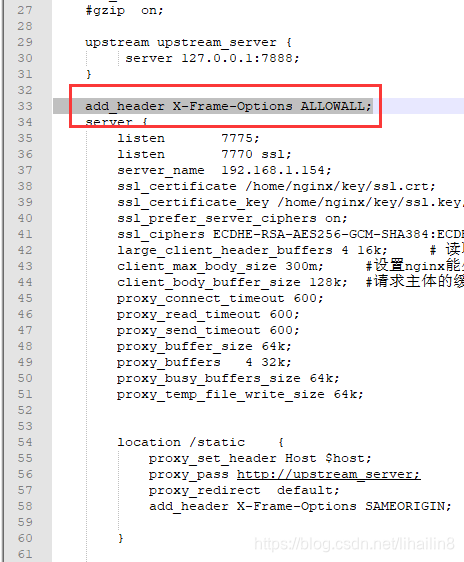
You can apply the X-Frame-Options header globally to all responses by placing the add_header directive within the http block in your nginx.conf. This ensures that every request served by your Nginx instance is protected.
http {
    # ... other http configurations ...
    add_header X-Frame-Options "DENY";
    # ...
}
Alternatively, you can apply it to specific server blocks for particular virtual hosts:
server {
    listen 80;
    server_name example.com;
    # ...
    add_header X-Frame-Options "DENY";
    # ...
}
Or, for even finer-grained control, you can apply it to specific location blocks, which is useful if only certain parts of your website require framing protection:
location /sensitive-data/ {
    add_header X-Frame-Options "DENY";
    # ... other configurations for this location ...
}

location /public-content/ {
    # Potentially allow framing here if absolutely necessary, though generally discouraged.
    # If you must, consider SAMEORIGIN or a very specific ALLOW-FROM.
    # For most cases, it's better to have no header or DENY.
}
Best Practices for X-Frame-Options Configuration
-
Prioritize
DENYorSAMEORIGIN: For maximum security and broad browser compatibility, always favorDENYorSAMEORIGINoverALLOW-FROM. Unless you have a very specific, well-justified reason for allowing framing from a particular URI, avoidALLOW-FROM. -
Apply Globally When Possible: If your entire website should be protected from clickjacking, applying the
add_headerdirective in thehttpblock is the most efficient and comprehensive approach. -
Contextual Application: If certain sections of your website have different framing requirements, use
serverorlocationblocks to apply the header contextually. For example, login pages and payment processing pages should always useDENY. -
Consider
Content-Security-Policy(CSP): WhileX-Frame-Optionsis excellent, CSP offers a more comprehensive security framework. CSP’sframe-ancestorsdirective can achieve similar or even more advanced framing control. For modern web applications, it’s recommended to implement both, or at least transition to CSP for framing policies.- Example of
frame-ancestorsin CSP:add_header Content-Security-Policy "frame-ancestors 'self' https://trusted-subdomain.example.com;";This example allows framing from the same origin (
'self') and a specific trusted subdomain. Note thatframe-ancestorsis a newer directive and might not be supported by very old browsers. For broader compatibility, you might include bothX-Frame-Optionsandframe-ancestors.
- Example of
-
Test Thoroughly: After implementing changes, always test your website thoroughly. Use browser developer tools to inspect the HTTP response headers and verify that the
X-Frame-Optionsheader is present and set to the desired value. Also, test with different browsers and on various devices to ensure consistent behavior. -
Restart Nginx: After modifying your Nginx configuration files, remember to reload or restart Nginx for the changes to take effect.
- To reload gracefully:
sudo systemctl reload nginxorsudo service nginx reload - To restart:
sudo systemctl restart nginxorsudo service nginx restart
- To reload gracefully:
-
Avoid Redundant Headers: Ensure you are not adding the
X-Frame-Optionsheader multiple times within the samelocationorserverblock. Nginx generally handles this, but explicit redundancy can lead to confusion.
Common Pitfalls and Troubleshooting
- Incorrect Syntax: Double-check the syntax of the
add_headerdirective. Typos or missing quotes can prevent the header from being applied. - Conflicting Headers: If you have multiple
add_headerdirectives forX-Frame-Optionsin nested contexts, the behavior might be unpredictable. Nginx typically uses the most specific rule. - Caching Issues: Sometimes, after making changes, you might still see the old behavior due to browser caching or CDN caching. Clear your browser cache and any relevant CDN caches.
httpvs.servervs.locationPrecedence: Nginx applies directives based on specificity. Headers defined inlocationblocks override those inserverblocks, which override those inhttpblocks.- Browser Compatibility of
ALLOW-FROM: As repeatedly mentioned, theALLOW-FROMdirective has inconsistent support. If your application relies on it, extensively test across target browsers. alwaysParameter foradd_header: In Nginx 1.7.5 and later, you can useadd_header X-Frame-Options "DENY" always;. Thealwaysparameter ensures the header is added even for error responses (e.g., 404, 500). This is generally good practice for security headers.
SEO Implications
While X-Frame-Options is primarily a security measure, its correct implementation can indirectly benefit SEO:
- Enhanced User Trust: A secure website that protects users from phishing and malicious attacks builds trust. Users are more likely to return to and engage with a site they perceive as safe. This positive user experience can indirectly influence rankings.
- Reduced Bounce Rates: If users are tricked into clicking on malicious links via clickjacking, they might land on unrelated or harmful content, leading to immediate bounces. Preventing clickjacking keeps users on your intended content.
- Brand Reputation: Protecting your brand from being exploited in malicious clickjacking schemes preserves your reputation. A compromised reputation can deter users and negatively impact your organic visibility.
- Preventing Content Misrepresentation: Clickjacking can be used to display your content in a misleading context, potentially harming your brand image and confusing users.
X-Frame-Optionsensures your content is displayed as intended.
Alternatives and Modern Approaches: Content Security Policy (CSP)
While X-Frame-Options remains a valuable and widely supported header, Content Security Policy (CSP) offers a more granular and powerful approach to controlling various aspects of content loading, including framing. The frame-ancestors directive within CSP specifically addresses framing policies and can be used to define which origins are allowed to embed your content.
A typical CSP implementation for framing might look like this:
add_header Content-Security-Policy "frame-ancestors 'self'; default-src 'self'; script-src 'self' 'unsafe-inline';" always;In this example:
frame-ancestors 'self': Allows the page to be framed only by documents from the same origin.default-src 'self': Sets the default policy for other content types (scripts, styles, images, etc.) to only allow resources from the same origin.script-src 'self' 'unsafe-inline': Allows scripts from the same origin and also inline scripts (useunsafe-inlinewith caution).
Advantages of CSP’s frame-ancestors over X-Frame-Options:
- Multiple Origins: CSP’s
frame-ancestorscan specify multiple allowed origins, providing more flexibility than the single URI inALLOW-FROM. - Wildcards and Subdomains: CSP allows for more sophisticated pattern matching, including wildcards for subdomains.
- Unified Security Policy: CSP consolidates various security directives into a single header, simplifying management and providing a holistic security approach.
- Broader Protection: CSP can control many other types of content injection attacks, not just framing.
When to Use Both X-Frame-Options and CSP frame-ancestors:
For maximum compatibility and layered security, it’s often recommended to implement both X-Frame-Options and CSP with the frame-ancestors directive. Older browsers that may not fully support frame-ancestors will still benefit from X-Frame-Options, while modern browsers will adhere to the more comprehensive CSP policy.
Conclusion
The X-Frame-Options HTTP header is an indispensable tool for preventing clickjacking attacks and safeguarding your website. By understanding its directives and implementing them correctly within Nginx, you can significantly enhance your website’s security posture. Prioritizing DENY and SAMEORIGIN, applying headers contextually, and testing thoroughly are key to effective implementation. As web security evolves, consider integrating CSP’s frame-ancestors directive for a more comprehensive and future-proof approach to framing control, often used in conjunction with X-Frame-Options for maximum reach. Proactive security measures like these are crucial for maintaining user trust, protecting sensitive data, and preserving brand integrity in the ever-evolving landscape of online threats.