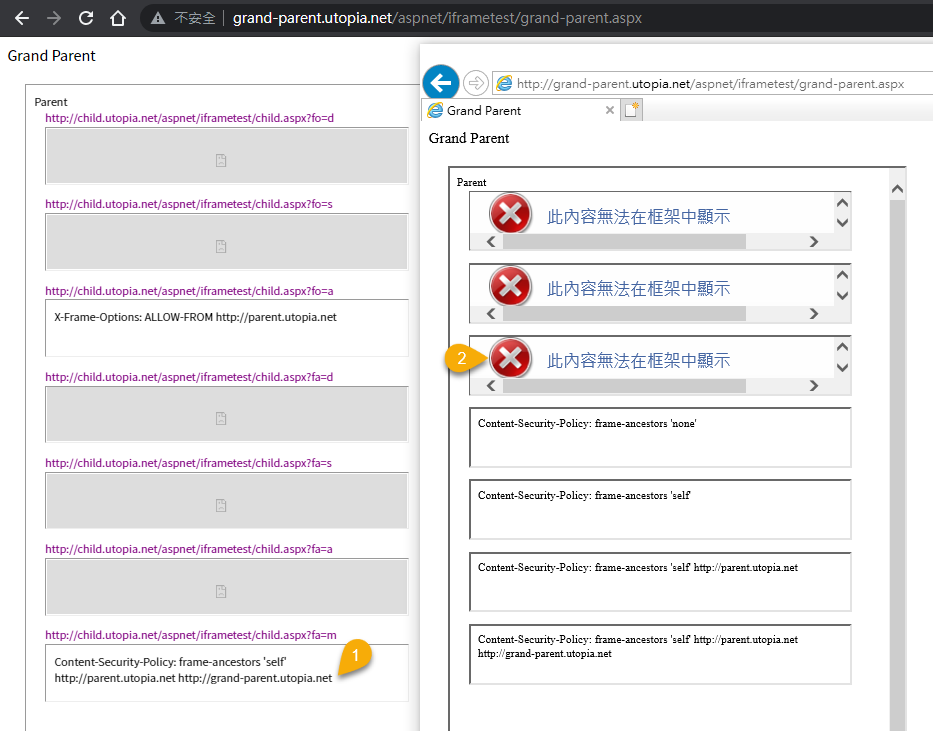
CSP frame ancestors configuration is a critical security measure for WordPress websites. It allows you to control which domains are permitted to embed your site in an iframe, significantly reducing the risk of clickjacking attacks. This detailed guide explores the intricacies of this essential CSP directive, from basic syntax to advanced implementation strategies.
By understanding how to configure frame-ancestors, you can fortify your site against malicious actors and safeguard your users’ data. This post delves into the practical applications and security considerations of this important configuration.
Introduction to CSP Frame Ancestors Configuration
Content Security Policy (CSP) is a powerful mechanism for mitigating various web security vulnerabilities. It allows web developers to specify the sources from which a web page is allowed to load resources, thereby preventing attacks like Cross-Site Scripting (XSS) and clickjacking. By carefully defining permitted sources, CSP enhances the security posture of web applications.The “frame-ancestors” directive in CSP is a crucial component for controlling how a web page can be embedded within frames or iframes.
This control is essential because embedded frames can be exploited to bypass security measures and manipulate user interactions or data. Properly configuring this directive strengthens the overall security posture of a web application by preventing malicious actors from embedding your site in a frame without your explicit permission.
Understanding the “frame-ancestors” Directive
The “frame-ancestors” directive is a crucial element of CSP. It precisely defines the origins that are permitted to embed a particular web page in a frame or iframe. This control is vital for preventing clickjacking attacks, where an attacker uses a transparent iframe to trick users into interacting with a malicious site disguised as the legitimate one. By limiting allowed origins, you safeguard users from such attacks.
Configuring the “frame-ancestors” Directive
The syntax for configuring the “frame-ancestors” directive is straightforward. It specifies the allowed origins, either by using a single origin or a list of origins. The directive works by specifying the origins that are allowed to embed your web page. If no origins are specified, the embedding is prohibited. This explicit permission is crucial to prevent unauthorized embedding and clickjacking attacks.
| Directive | Value | Description |
|---|---|---|
| frame-ancestors | ‘self’ | Allows embedding only from the same origin. |
| frame-ancestors | ‘https://example.com’ | Allows embedding only from ‘https://example.com’. |
| frame-ancestors | ‘https://example.com’, ‘https://anothersite.com’ | Allows embedding from ‘https://example.com’ and ‘https://anothersite.com’. |
| frame-ancestors | none | Disallows embedding from any origin. |
Understanding the Directive’s Values
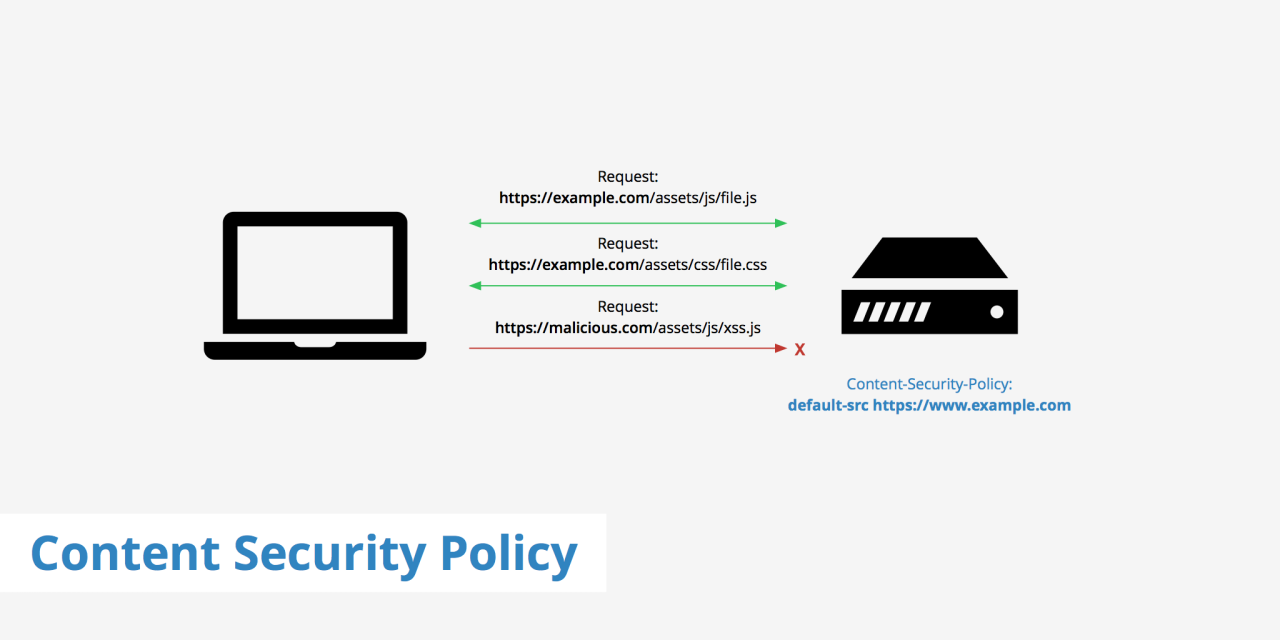
The “frame-ancestors” directive in Content Security Policy (CSP) is a powerful tool for controlling where your web pages can be embedded within frames or iframes. This granular control is crucial for enhancing security by mitigating clickjacking attacks and ensuring the integrity of your application. Understanding the different values and their implications is key to implementing robust security measures.The “frame-ancestors” directive allows you to specify which origins are permitted to embed your page in a frame.
This is essential for preventing malicious websites from loading your content within their own frames, which could potentially lead to security vulnerabilities. By carefully defining the allowed origins, you can protect your site from clickjacking attacks and maintain control over how your content is presented.
CSP frame ancestor configuration is all about controlling access to resources within an iframe. It’s crucial for security, preventing unwanted access and data breaches. This directly relates to the current state of college basketball, where, as seen in the latest power rankings, Utah State is currently atop the West, with SMC experiencing a surge after a tough stretch.
This emphasizes the importance of careful configuration, especially as complex web applications become more common, directly impacting the overall security posture of the framework. Solid CSP frame ancestor configuration is key.
Different Values for the Directive
The “frame-ancestors” directive accepts various values, each with distinct implications for frame embedding. The most common values are ‘*’ and specific URLs or domains.
Implications of Using ‘*’ vs. Specific Domains
Using the wildcard character ‘*’ allows any origin to embed your content in a frame. This approach is generally discouraged because it significantly weakens the security benefits of CSP. On the other hand, specifying specific domains or URLs permits embedding only from those explicitly listed. This approach offers much stronger protection against clickjacking attacks. Specific domains are far more secure than the wildcard.
Digging into CSP frame ancestors configuration can be tricky, but it’s crucial for security. These protests across the Bay Area surrounding Tesla, for example, highlight the complexities of political movements, like this recent situation , where internal conflicts within a party could potentially hinder progress. Ultimately, mastering CSP frame ancestors configuration is about building robust defenses against attacks, just like navigating the political landscape requires careful strategy.
Restricting Frame Embedding to Specific Origins
To restrict frame embedding to specific origins, list the permitted origins in the “frame-ancestors” directive. For example, if you want only “example.com” and its subdomains to embed your content, you would specify “example.com”.Example:“`Content-Security-Policy: frame-ancestors ‘self’ example.com;“`This policy permits embedding only from the same origin (self) or from example.com.
Allowing Embedding from Subdomains and Wildcard Domains
To permit embedding from subdomains, include the parent domain with a wildcard character. For instance, to allow embedding from any subdomain of example.com, use:Example:“`Content-Security-Policy: frame-ancestors ‘self’
.example.com;
“`This policy permits embedding from the same origin and all subdomains of example.com.
Comparison of Directive Values
| Value | Description | Security Implications |
|---|---|---|
| ‘*’ | Allows embedding from any origin. | Low security, highly vulnerable to clickjacking. |
| ‘self’ | Allows embedding only from the same origin. | Moderate security, protects against some attacks. |
| Specific URL/Domain | Allows embedding only from the specified origin. | High security, strong protection against clickjacking. |
| *.example.com | Allows embedding from all subdomains of example.com. | Moderate security, but protects against attacks targeting subdomains. |
Practical Use Cases and Examples
The “frame-ancestors” directive in Content Security Policy (CSP) is a powerful tool for mitigating various security risks, particularly those related to frame embedding and clickjacking. Understanding how to effectively utilize this directive is crucial for building robust and secure web applications. This section delves into practical use cases, illustrating scenarios where configuring “frame-ancestors” is essential and demonstrates its application in preventing common attacks.Configuring “frame-ancestors” allows websites to precisely control where their content can be embedded within iframes.
This granular control strengthens security posture by restricting unauthorized access and embedding, which significantly reduces the risk of attacks.
Restricting Frame Embedding from Unauthorized Sources
Controlling the origins from which a website can be embedded is a fundamental aspect of security. A website might want to restrict its content from being embedded within iframes from malicious or untrusted domains. This approach prevents clickjacking and other attacks where an attacker uses an iframe to trick users into interacting with a different site.For instance, imagine a company website with sensitive information.
A potential attack vector would be a malicious site embedding the company’s login page within a transparent iframe. The attacker could then manipulate the user’s interaction to steal credentials.By specifying the allowed origins in the “frame-ancestors” directive, you can prevent this scenario. This allows the company’s website to control the origins from which it can be embedded.
Preventing Clickjacking Attacks
Clickjacking attacks exploit the ability of an attacker to trick users into clicking on a button or link on a different site, when in reality, they’re interacting with a malicious target. Using the “frame-ancestors” directive, websites can explicitly define the domains that are permitted to embed their content within frames.For example, consider a banking site. To safeguard against clickjacking, the “frame-ancestors” directive could be configured to only allow embedding from the bank’s own domain.
This configuration prevents malicious sites from embedding the bank’s login page in a hidden iframe, leading to a compromised account.
Enhancing Security for Sensitive Content
Protecting sensitive content, such as login forms or payment processing pages, is critical. By specifying allowed origins, the “frame-ancestors” directive provides an extra layer of security against frame-based attacks.Imagine a website handling sensitive financial transactions. To protect these transactions, the “frame-ancestors” directive can be configured to permit embedding only from its own domain. This prevents malicious actors from creating an iframe and potentially intercepting or manipulating sensitive data.
Common Use Cases and Configurations
| Use Case | Configuration | Description |
|---|---|---|
| Restrict embedding from all but trusted domains | frame-ancestors 'self' |
Allows embedding only from the same origin. |
| Allow embedding only from specific domains | frame-ancestors 'https://example.com', 'https://another-trusted.com' |
Explicitly permits embedding from listed domains. |
| Prevent embedding from untrusted domains | frame-ancestors 'none' |
Disallows embedding from any origin. |
| Allow embedding from a specific domain and its subdomains | frame-ancestors 'https://example.com' |
Embeds content from the specified domain and its subdomains. |
Security Considerations and Best Practices
Proper configuration of the `frame-ancestors` directive in Content Security Policy (CSP) is crucial for safeguarding web applications from various attacks. Ignoring this directive opens doors for malicious actors to exploit vulnerabilities, leading to significant security risks. Understanding the potential threats and implementing robust configurations is paramount for maintaining a secure online environment.By carefully defining allowed origins for embedding iframes, developers can mitigate the risk of clickjacking and other attacks that target the trust and integrity of the web application.
Thorough testing and awareness of the potential impact on user experience are essential for a balanced approach to security and usability.
Potential Vulnerabilities without Proper Configuration
Ignoring the `frame-ancestors` directive exposes applications to clickjacking attacks. Attackers can trick users into interacting with malicious content embedded within seemingly legitimate frames. This vulnerability can lead to sensitive data breaches, unauthorized access, and compromised user accounts. The lack of control over where frames can be embedded weakens the overall security posture of the web application.
Clickjacking Risks and Mitigation with CSP
Clickjacking attacks involve tricking users into clicking on hidden elements within an iframe. The attacker’s malicious iframe is often disguised as a legitimate website, and when a user interacts with it, the attacker gains control over actions performed within the main application. The `frame-ancestors` directive is a powerful tool to mitigate these risks. By specifying the allowed origins for embedding iframes, the application restricts the potential for clickjacking.
For instance, specifying `frame-ancestors ‘self’` limits embedding to only the same origin, effectively blocking external iframes. This approach significantly reduces the attack surface.
Testing Configurations for Effectiveness
Thorough testing is essential to ensure the `frame-ancestors` configuration is effective. Testing should cover various scenarios, including legitimate uses of iframes and potential attack vectors. Automated tools and manual penetration testing are crucial. For example, testing with different browsers and configurations will reveal any potential vulnerabilities or inconsistencies in the implementation. By employing both automated and manual methods, developers can build confidence in the security of their application.
Impact of Different Configurations on User Experience
The `frame-ancestors` directive can influence user experience, particularly when dealing with third-party embeds. A strict configuration that allows only the same origin might prevent users from interacting with certain features. A more permissive configuration, on the other hand, may increase the risk of clickjacking. Finding a balance between security and usability is key. The optimal configuration should minimize the risk of attacks without severely limiting legitimate use cases.
Security Considerations and Best Practices Summary
| Security Consideration | Best Practice | Impact |
|---|---|---|
| Clickjacking vulnerability | Configure `frame-ancestors` directive to restrict embedding to trusted origins. | Reduces risk of malicious content within iframes. |
| Unrestricted frame embedding | Specify `frame-ancestors ‘none’` or `frame-ancestors ‘self’` as default. | Reduces potential for clickjacking attacks. |
| Testing inadequacy | Thoroughly test the configuration with various scenarios, including both legitimate and malicious iframe requests. | Ensures the configuration is robust against potential vulnerabilities. |
| User experience limitations | Find a balance between security and usability. Consider the needs of legitimate use cases. | Provides a secure application without overly restricting user experience. |
Implementation and Troubleshooting
Putting the “frame-ancestors” directive into practice involves careful configuration to enhance the security posture of your web application. This section details the steps for implementing this crucial directive, common pitfalls, and troubleshooting strategies. Understanding these aspects allows you to effectively protect your application from clickjacking attacks.Implementing the “frame-ancestors” directive involves modifying your server’s HTTP headers to restrict the origins that can embed your website in iframes.
This effectively limits potential vulnerabilities and enhances security.
Implementing the “frame-ancestors” Directive
Configuring the “frame-ancestors” directive involves setting the appropriate header values in your web server’s configuration. This usually means editing the server’s configuration file to add a header directive. The specific syntax varies depending on the web server (e.g., Apache, Nginx).
CSP frame ancestors configuration is all about controlling where your web page’s frames can load content from. This is crucial for security, preventing malicious sites from sneaking in through your frames. Recently, federal agencies blocked doge data disclosure, highlighting the importance of similar protections in a different context. This sort of data control is similar to how CSP frame ancestors configuration prevents unauthorized access to content, ensuring your web pages aren’t compromised by unwanted elements.
Ultimately, understanding CSP frame ancestors configuration is key for maintaining a secure web environment, whether you’re dealing with potential data breaches or just keeping your site safe from malicious activity. federal agencies blocked doge data disclosure is a fascinating example of this broader principle.
- Identify the correct configuration file: Locate the configuration file for your web server. For Apache, this is typically a `.conf` file within the server’s configuration directory. For Nginx, it might be a file within the `/etc/nginx/` directory.
- Add the header directive: Within the configuration file, locate the appropriate section for handling HTTP responses. Add the “frame-ancestors” directive with the allowed origins. For example, to allow embedding from `example.com`, the directive would look like this:
Header set Content-Security-Policy "frame-ancestors 'self' example.com;" - Save and restart the server: After modifying the configuration file, save the changes and restart the web server. This ensures the new settings are applied.
Common Errors
Incorrect syntax, missing directives, or misconfigured allowed origins are common problems.
- Incorrect syntax: Ensure the syntax for the “frame-ancestors” directive is accurate. Carefully check the quotation marks, single quotes, and the use of the “self” .
- Missing directives: Verify that the “Content-Security-Policy” header is present in the response. The directive itself may also be missing from the configuration.
- Incorrect or missing origins: Double-check that the allowed origins are correctly specified and match the expected domains.
Troubleshooting Issues
Several techniques can help pinpoint and resolve configuration problems.
- Verify the HTTP response headers: Use developer tools in your browser to inspect the HTTP headers returned by the server. Check if the “Content-Security-Policy” header is present and contains the correct directive.
- Inspect server logs: Examine the server logs for any error messages related to the configuration or the “frame-ancestors” directive.
- Test with different browsers: Verify that the configuration works correctly across different browsers and devices. Inconsistencies could indicate an issue with the configuration or the browser interpretation of the header.
- Use a dedicated CSP testing tool: Online tools are available to test CSP configurations and identify potential vulnerabilities. These tools can help verify the integrity of the implemented directive.
Example Configuration (Apache)
| Configuration Section | Directive |
|---|---|
|
Header set Content-Security-Policy "frame-ancestors 'self' https://example.com;" |
This example demonstrates adding the “frame-ancestors” directive within an Apache virtual host configuration. The directive specifies that only the current domain and https://example.com are allowed to embed the site.
Advanced Configuration Options: Csp Frame Ancestors Configuration
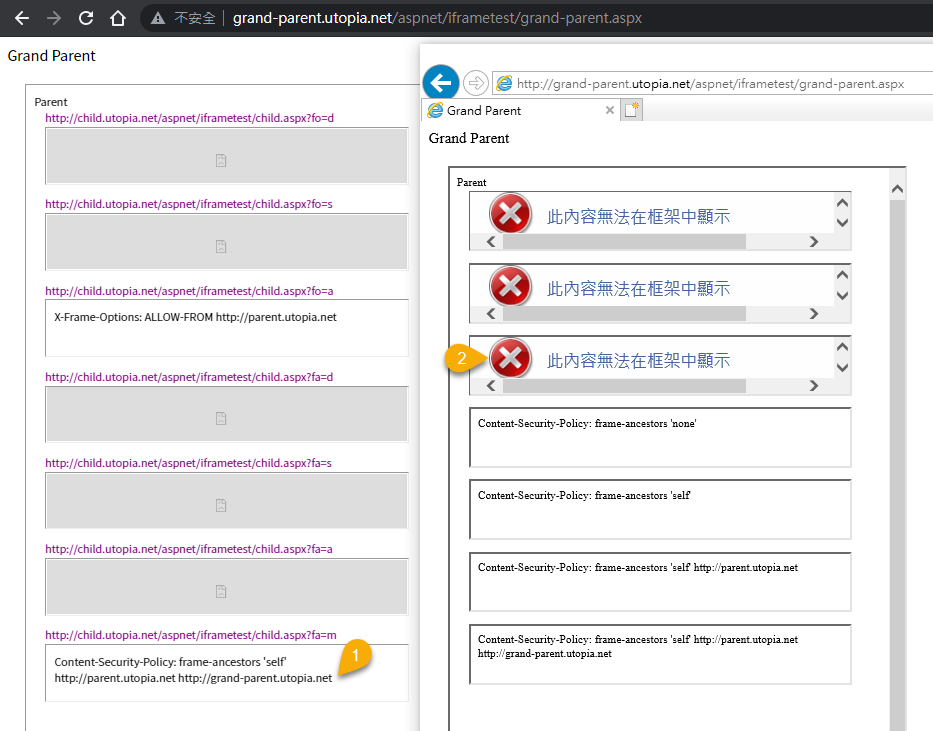
Beyond the basics of specifying allowed origins, the Content Security Policy (CSP) frame-ancestors directive offers granular control over how frames and iframes interact with each other and external resources. This advanced configuration allows for more tailored security measures, crucial for preventing attacks like clickjacking and cross-origin frame embedding. This section delves into configuring the directive for various frame types, protocol restrictions, exception handling, integration with other CSP directives, and presents a summary table for quick reference.
Frame Type Specificity
The frame-ancestors directive isn’t limited to a single type of frame. It allows you to specify different policies for iframe and frameset elements, ensuring targeted protection against vulnerabilities associated with each type. This enables you to set different restrictions for embedded content depending on the type of frame used.
Protocol Restrictions
The frame-ancestors directive can be used to restrict the protocols permitted for loading content within frames. This allows you to limit the sources to only secure connections (HTTPS) or permit both HTTP and HTTPS. For example, a website might only allow iframes to load content from HTTPS sources.
Specifying protocols is crucial for maintaining security and preventing mixed content issues, which can be exploited by attackers.
Handling Exceptions and Allowlists
Sometimes, you might need to allow specific origins to load content within frames even if they don’t match your standard policy. This is where exceptions and allowlists come into play. You can create a list of trusted origins that are exempt from the restrictions.
Using allowlists is an effective way to mitigate potential security risks associated with untrusted sources, while exceptions ensure necessary functionality is maintained.
Integration with Other CSP Directives
The frame-ancestors directive can be combined with other CSP directives to create a comprehensive security policy. This enables a layered approach to security, reinforcing protection against various attack vectors. This synergistic approach ensures robust defense mechanisms against vulnerabilities.
Advanced Configuration Options Summary
| Option | Description | Example |
|---|---|---|
| Frame Type | Specify policies for iframe and frameset elements. |
frame-ancestors 'self' (for only same-origin) |
| Protocol Restriction | Restrict protocols (HTTP, HTTPS) for content within frames. | frame-ancestors 'https://example.com' (only HTTPS) |
| Exceptions/Allowlists | Define trusted origins or specific exceptions. | frame-ancestors 'self', 'https://trusted.example.com' |
| Integration with other directives | Combine with other CSP directives for comprehensive security. | frame-ancestors 'self'; script-src 'self' 'unsafe-inline'; style-src 'self' 'unsafe-inline' |
CSP Frame Ancestors Configuration in Different Browsers
The “frame-ancestors” directive in Content Security Policy (CSP) is crucial for mitigating clickjacking attacks. However, its effectiveness hinges on consistent support across various browsers. Understanding the nuances of browser compatibility is vital for deploying robust security measures.The “frame-ancestors” directive controls which origins are allowed to embed a page within an iframe. A poorly configured directive can leave your application vulnerable, while a correctly implemented one enhances the security posture significantly.
Therefore, a deep dive into browser support is essential for a complete understanding of its usage.
Browser Compatibility Issues, Csp frame ancestors configuration
Different browsers may interpret the “frame-ancestors” directive in slightly different ways, leading to compatibility issues. This can result in unexpected behavior, where a page might load in one browser but not another. These inconsistencies can manifest as broken functionality or security vulnerabilities if not accounted for.
Comparison of Support Across Browsers
CSP’s “frame-ancestors” directive is supported by a majority of modern browsers. However, older versions or less common browsers may not fully implement the directive or exhibit variations in its handling. This requires careful consideration during implementation.
Known Limitations and Edge Cases
Some edge cases exist where the “frame-ancestors” directive might not function as expected. These include scenarios involving mixed content, specific configurations of proxies or intermediaries, or complex interactions with other security mechanisms. For instance, a proxy server might alter the request in a way that the browser doesn’t correctly interpret. Proper testing across different configurations is paramount.
Summary Table of Browser Compatibility
| Browser | Version | Support | Notes |
|---|---|---|---|
| Chrome | 70+ | Full | Generally reliable support. |
| Firefox | 60+ | Full | Consistent support for recent versions. |
| Safari | 11+ | Full | Excellent support in recent versions. |
| Edge | 79+ | Full | Consistently good support in recent versions. |
| Opera | 50+ | Full | Solid support in modern versions. |
| Internet Explorer | All | No | Not supported, use alternative security measures. |
Note: This table is a general overview and specific behaviors may vary based on the exact browser version and configuration. Always test your CSP configuration in a variety of environments to ensure it functions as expected.
Illustrative Examples of Effective Implementations
Implementing the “frame-ancestors” directive effectively involves carefully defining the allowed origins that can embed your web application within an iframe. This prevents malicious sites from embedding your content, thus enhancing security. A well-configured directive prevents clickjacking attacks and safeguards your application from unwanted framing.
Sample Web Application
This example demonstrates a simple web application using the “frame-ancestors” directive to control which origins are allowed to embed it. The key is to define the permitted origins explicitly, reducing the attack surface.
// index.html
<html>
<head>
<meta http-equiv="Content-Security-Policy" content="frame-ancestors 'self' https://example.com">
</head>
<body>
  <p>This is a sample web application.</p>
</body>
</html>
Explanation of Code Structure
The provided code snippet demonstrates a simple HTML file (`index.html`) incorporating the Content-Security-Policy (CSP) header. The ` ` tag with the `http-equiv` attribute set to `Content-Security-Policy` defines the CSP policy. The `frame-ancestors` directive is specified within the policy.
The policy explicitly allows embedding from the current origin (`’self’`) and the origin `https://example.com`. Any other origin attempting to embed this page in an iframe will be blocked.
// Allowed origins:
// 'self': The current origin (e.g., http://mysite.com)
// https://example.com:  Explicitly permits embedding from this origin.
Practical Implications
By implementing this directive, the application restricts which websites can embed it. This approach helps prevent clickjacking attacks where malicious sites try to trick users into clicking on seemingly legitimate links. Restricting embedding to specific domains safeguards against unauthorized use of the application’s content within malicious contexts.
// Example of a blocked embedding attempt:
// If a website other than 'self' or 'https://example.com' tries to embed this page, the browser will prevent it.
Further Considerations
More complex applications might require a more nuanced approach to the `frame-ancestors` directive, potentially using wildcard domains or patterns to manage permitted origins. The specific implementation should align with the application’s security needs and the anticipated range of embedding scenarios.
Final Conclusion
In conclusion, properly configuring CSP frame ancestors is a crucial step in securing your WordPress site. By understanding the directive’s values, practical use cases, and security considerations, you can effectively mitigate clickjacking attacks and protect your sensitive content. This guide provides a comprehensive understanding of this essential security measure, equipping you with the knowledge to implement it effectively in your WordPress environment.